Gradira: Photo Color Editor

Gradira: Photo Color Editor Summary
Gradira: Photo Color Editor is a free, with in-app purchases iOS app in Photo And Video by Feng Xia. Released in Jan 2026 (9 months ago). It has 1.00 ratings with a 4.00★ (good) average. Based on AppGoblin estimates, it reaches roughly 2.00 monthly active users and generates around $<10K monthly revenue (100% IAP / 0% ads). Store last updated Sep 23, 2026
Gradira: Photo Color Editor SDKs Summary
App not yet scanned for SDKs.
4★
Ratings: 1.00
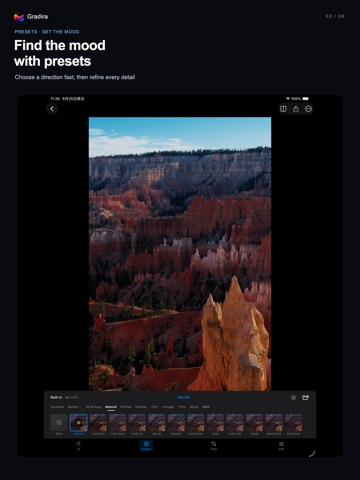
Screenshots



App Description
One tap to a new look. Start with AI Auto Color, then make the result your own.
AUTO COLOR
Generate a color treatment for your current photo and adjust its strength. Compare before and after, then refine light and color with curves, HSL and basic adjustments.
LOOKS AND PRECISE CONTROL
• Explore curated looks or import your own .cube LUTs.
• Browse built-in looks and My LUTs separately; organize your own groups.
• Shape light with luminance and RGB curves; adjust eight color ranges with HSL.
• Crop, rotate, straighten and correct perspective.
• Use LUT workflows for camera Log, sRGB and Display P3 inputs.
FROM ONE PHOTO TO A SET
Open RAW, JPG, HEIC, PNG, TIFF and WebP. Keep edits with each photo, copy selected adjustment categories and batch export individual results. Review export results and retry failed items. Auto Color effects are specific to each photo and cannot be copied to another.
REFERENCE COLOR
Explore another starting point with built-in or personal reference photos. Reference Color uses color and tone from a similar scene as inspiration; results vary with the photos you choose.
EXPORT
Save JPEG or HEIF; RAW workflows also support 16-bit TIFF. Available formats and destinations depend on the input and export settings. Adapt and export your own LUT files for other workflows. Built-in LUT files cannot be exported.
FREE AND PRO
Free: basic adjustments, selected looks, eligible JPEG export, and previews of curves and HSL. Auto Color and Reference Color are free to generate, preview and adjust.
Pro: export photos with Auto Color, Reference Color, curve or HSL effects; access the full look library, unlimited LUT imports, HEIF and supported TIFF export, batch processing and user LUT file export.
Free LUT imports have current-library and cumulative limits. Imported LUTs remain available to view, apply and organize after Pro expires.
iOS 17.0+. Pro is shared with macOS; features differ by platform. Photo processing runs on device. Initial preparation of intelligent tools may require an internet connection.
Subscription automatically renews unless turned off at least 24 hours before period end.
Terms: https://www.apple.com/legal/internet-services/itunes/dev/stdeula/
Privacy: https://lutalchemist.com/privacy/