Mermaid Editor - MMChart Live

Mermaid Editor - MMChart Live Summary
Mermaid Editor - MMChart Live is a free, ad-supported, with in-app purchases iOS app in Developer Tools by Hieu Nguyen. Released in Jan 2026 (7 months ago). It has 12 ratings with a 4.67★ (excellent) average. Based on AppGoblin estimates, it reaches roughly 58 monthly active users and generates around $<10K monthly revenue (57% IAP / 43% ads). Store last updated May 7, 2026
Mermaid Editor - MMChart Live SDKs Summary
App not yet scanned for SDKs.
4.67★
Ratings: 12
Screenshots



App Description
Bring your ideas to life with the power of Mermaid Live Editor - anytime, anywhere.
Whether you are a developer mapping out system architecture, a student visualizing logic, or a project manager building Gantt charts, Mermaid Live Editor is the ultimate mobile workspace for Mermaid diagrams. No more waiting to get back to your desk; write code and visualize complex charts directly on your phone with a seamless, high-performance editor.
Key Features:
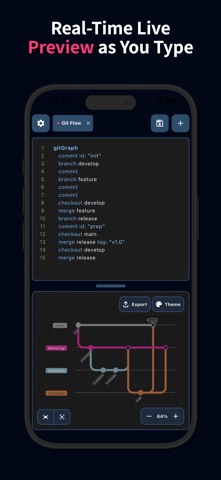
- Real-Time Live Preview: See your diagrams take shape as you type. Our split-screen or toggle view ensures your visual logic matches your code instantly.
- Full Syntax Highlighting: Write clean, readable code with an editor designed specifically for Mermaid syntax.
- Support for All Chart Types: Flowchart, Sequence Diagram, Class Diagram, State Diagram, Entity Relationship Diagram, User Journey, Gantt, Pie Chart, Quadrant Chart, Requirement Diagram, GitGraph Diagram, C4 Diagram, Mindmap, Timeline, Zenuml, Sankey, XYChart Diagram, Block Diagram, Packet Diagram, Kanban Diagram, Architecture Diagram, Radar Diagram, Treemap Diagram.
- Learn & Template Gallery: New to Mermaid? Browse our library of examples to learn the syntax and kickstart your projects with one tap.
- Powerful File Management: Open, edit, and save .mmd files directly. Keep your workflow consistent across your mobile and desktop environments.
- Professional Exports: Share your work in high resolution. Export your diagrams in PNG, JPEG, WebP, SVG, or PDF formats.
- Offline Mode Support: No internet? No problem. Generate and preview diagrams locally without needing a network connection.
Why Choose Mermaid Live Editor?
- Speed: Light-weight and optimized for mobile performance.
- Versatility: Perfect for documentation, software design, and business presentations.
- Privacy: Your data stays on your device.
Turn complex thoughts into beautiful diagrams with Mermaid Chart Editor. Download now and start creating!
Term of Use: https://termux-studio.org/terms-of-use?name=Mermaid
Privacy Policy: https://termux-studio.org/privacy-policy?name=Mermaid