SpeedyReader RSVP Speed Reader

SpeedyReader RSVP Speed Reader Summary
SpeedyReader RSVP Speed Reader is a free, with in-app purchases iOS app in Books And Reference by Mahanti Corporation. Released in Jan 2026 (9 months ago). It has 7.00 ratings with a 4.52★ (excellent) average. Based on AppGoblin estimates, it reaches roughly 59 monthly active users and generates around $<10K monthly revenue (100% IAP / 0% ads). Store last updated Oct 6, 2026
SpeedyReader RSVP Speed Reader SDKs Summary
App not yet scanned for SDKs.
4.52★
Ratings: 7.00
Screenshots



App Description
Paste an article, open a PDF or send a page from Safari, and SpeedyReader plays it back one word at a time, anywhere from 100 to 1,200 words a minute. Your eyes stay put, so you stop re-reading lines.
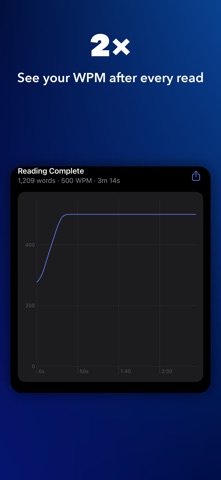
Most people read about 250 words a minute. At 500, a 5,000-word article takes 10 minutes instead of 20, and a 300-page book takes about 2½ hours instead of 5. You see your speed after every read, and Metrics keeps your streak, your personal records and a running total of the time you've saved.
The method is RSVP, rapid serial visual presentation. In normal reading your eyes jump from point to point and drift back over lines you've already read. Here every word lands in the same place, lined up on its optimal recognition point: the letter your eye locks onto first, shown in color.
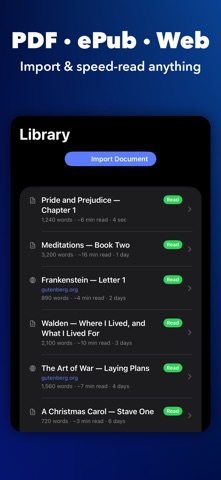
Import PDF, ePub, DOCX, ODT, RTF, TXT, Markdown, HTML and CSV files. Share links from Safari, News, X, Mail or Messages, or paste anything you've copied. Scanned and image-only PDFs go through on-device text recognition, and on devices with Apple Intelligence, Magic Wand repairs the broken lines and hyphenation a scan leaves behind. Books and long PDFs open with a chapter list, so you can go straight to the section you need.
Warm-Up starts you slower and ramps up to your target speed. SmartFlow adds a short pause at the end of each sentence. Choose from six highlight colors and four fonts, and pinch to resize the word.
Your library and reading history sync through iCloud across iPhone, iPad and Mac. On Mac, Space and the arrow keys control playback, and Keep Window on Top holds the reader over whatever you're working in.
There's no account to create. What you read stays on your devices and in your own iCloud.
Terms: https://www.apple.com/legal/internet-services/itunes/dev/stdeula/
Privacy Policy: https://mahanticorp.vercel.app/speedreader/privacy-policy