QR Code: Scan QR & Barcode

QR Code: Scan QR & Barcode Summary
QR Code: Scan QR & Barcode is a free, ad-supported, with in-app purchases iOS app in Tools by DISTRITO SLU. Released in Jan 2026 (7 months ago). It has 2.00 ratings with a 5.00★ (excellent) average. Based on AppGoblin estimates, it reaches roughly 24 monthly active users and generates around $<10K monthly revenue (75% IAP / 25% ads). Store last updated Mar 5, 2026
QR Code: Scan QR & Barcode SDKs Summary
App not yet scanned for SDKs.
5★
Ratings: 2.00
Screenshots



App Description
Unlock the full power of QR codes and barcodes with QR Code: Scan QR & Barcode, the ultimate scanning tool for your iPhone. Whether you need to scan a restaurant menu, check a product price, or share your Wi-Fi instantly, QR Code: Scan QR & Barcode makes it fast, easy, and secure.
Designed with a clean interface and lightning-fast detection, this is the only QR utility you will ever need.
KEY FEATURES:
• Lightning-Fast Scanner: Instantly scan all QR codes and barcodes (UPC, EAN, ISBN, etc.). Just point your camera and get results immediately.
• Smart History: Never lose a link again. QR Code: Scan QR & Barcode automatically saves your scan history so you can revisit websites, product details, or contact information whenever you need them.
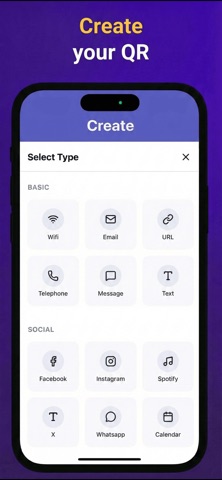
• Create Your Own QR Codes: Easily generate custom QR codes to share Wi-Fi networks, contacts (vCard), websites, plain text, and more.
• Barcode Generator: Easily create your own barcodes (UPC, EAN, Code 128) for inventory management, product labeling, or personal organization.
• Universal Compatibility: Works seamlessly with text, URLs, ISBNs, products, contacts, calendars, emails, locations, and Wi-Fi.
• Clean & Modern Design: An intuitive user interface designed for efficiency and ease of use.
Download QR Code: Scan QR & Barcode today and simplify how you interact with the world around you!
This app contains subscription:
Your subscription automatically renews unless auto-renew is turned off at least 24 hours before the end of the current period. Your account will be charged for renewal within 24 hours prior to the end of the current period, and the cost of the renewal will be identified. You can manage your subscriptions and turn off auto-renewal by going to your Account Settings after purchase. Any unused portion of a free trial period, if offered, will be forfeited when you purchase a subscription, where applicable.
https://distritoapps.com/terms
https://distritoapps.com/