Pydroid 3

Pydroid 3 Summary
Pydroid 3 is a free, ad-supported, with in-app purchases iOS app in Developer Tools by Hieu Nguyen. Released in Jan 2026 (6 months ago). It has 34 ratings with a 4.54★ (excellent) average. Based on AppGoblin estimates, it reaches roughly 271 monthly active users and generates around $<10K monthly revenue (56% IAP / 44% ads). Store last updated Aug 5, 2026
Pydroid 3 SDKs Summary
App not yet scanned for SDKs.
4.54★
Ratings: 34
Screenshots



App Description
A complete Python development environment that runs entirely on your device.
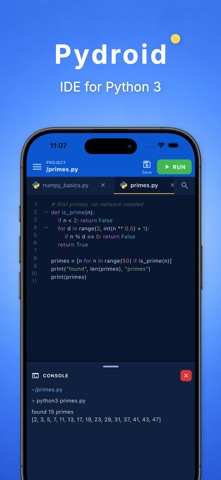
Pydroid 3 bundles a real CPython interpreter inside the app, so your code runs offline — on a plane, on the subway, anywhere. No account, no server, no setup. Just open a file and hit RUN.
WHAT YOU CAN DO
• Run Python offline
Your scripts execute in an embedded interpreter on your iPhone or iPad. No internet connection required.
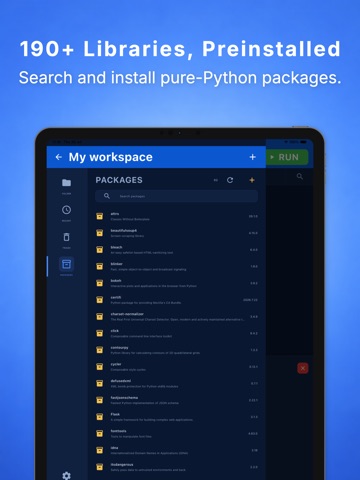
• 190+ libraries, preinstalled
NumPy, pandas, Matplotlib, Seaborn, SciPy, scikit-learn, Plotly, Bokeh, Pillow, Requests, BeautifulSoup, SymPy-style scientific tooling, Flask, Django, Kivy, Pygame and many more are ready to import from the first launch.
• Package manager
Browse everything installed in your environment, inspect versions, authors and project links, then search PyPI to install additional pure-Python packages — or uninstall what you no longer need.
• Jupyter notebooks
Open, edit and run .ipynb files with a real cell-based editor. Mix code and Markdown cells, run cells individually, and see text output, tracebacks and inline images right where you expect them.
• Multi-tab editor
Work across several files at once and switch between them instantly with a smooth tab bar.
• Smart code assistance
Syntax highlighting, keyword and symbol suggestions while you type, and real-time syntax checking so mistakes surface before you run.
• Instant symbol navigation
Jump straight to any class, function or variable, and use Find & Replace across the current file.
• Rich, visual output
A console for stdout and stderr, plus a Preview tab that renders Matplotlib charts as images and opens interactive Plotly/Bokeh HTML charts in a built-in viewer. Markdown files get a live preview too.
• A real workspace
Create projects, files and folders; import files and folders from the Files app; reopen recent work in a tap; and recover anything you deleted from Trash.
• Learn as you go
Every install starts with a built-in library: a 10-chapter Python course (variables, operators, strings, lists, tuples, sets, dictionaries, conditionals, loops) and a Data Science track covering NumPy, pandas, Matplotlib and Seaborn — all as editable, runnable files.
• Made for how you work
Dark and Blue editor themes, and a full interface in 12 languages: English, Arabic, German, Filipino, Hindi, Portuguese, Russian, Thai, Turkish, Urdu, Vietnamese and Chin