Daily Time Pie 〜 Time Tracker

Daily Time Pie 〜 Time Tracker Summary
Daily Time Pie 〜 Time Tracker is a free, ad-supported, with in-app purchases iOS app in Lifestyle by Kengo Saito. Released in Feb 2026 (7 months ago). Store last updated Oct 11, 2026
Daily Time Pie 〜 Time Tracker SDKs Summary
App not yet scanned for SDKs.
0★
Ratings: 0
Screenshots


App Description
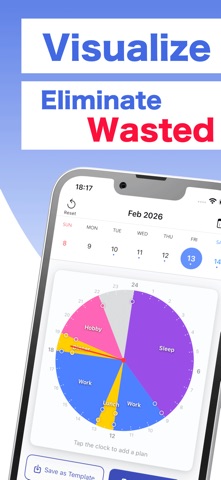
Visualize your day with a 24-hour pie chart.
Simply register your schedule on a circular clock to see your daily time allocation at a glance.
Move events with drag & drop, or adjust their duration by pulling the handles.
Intuitive controls make daily time management more enjoyable.
Attach notes and to-dos to your events to manage "when and what to do" all in one place.
Perfect for those who want to reflect on their time usage, improve their daily rhythm, and steadily get things done.
ーーーーーーーーーーーーーーーーーーーーーー
Recommended for
ーーーーーーーーーーーーーーーーーーーーーー
・Review how you spend your time each day
・Establish a healthy daily routine
・Manage your everyday routines
・Understand the balance between work and rest
・Analyze weekly and monthly time allocation
・Manage a to-do list for each event
・Prefer simple and intuitive apps
ーーーーーーーーーーーーーーーーーーーーーー
App Features
ーーーーーーーーーーーーーーーーーーーーーー
■ Manage schedules with a 24-hour pie chart
Simply register events on the circular clock. Your daily time allocation is visible at a glance like a pie chart.
Tap any empty time slot to quickly add a new event.
■ Intuitive drag operations
Move events to different time slots with drag & drop.
Pull the handles to freely adjust start and end times.
Supports events that span across midnight.
■ Attach notes & to-dos to events
Leave notes or add to-dos (task lists) for each event.
Manage completion with checkboxes and see your progress at a glance, like "2/5".
Reorder by dragging and delete by swiping—it's easy.
Because you can manage "what to do at this time" together with your schedule, your plans and tasks stay in one place.
■ Categorize by type
Work, Study, Exercise, Hobby, Housework, Meal, Sleep, Commute, Other.
Color-code events by category to clearly organize how you spend your time.
■ Template feature
Same schedule every week? Save a day's schedule as a template and apply it with one tap.
Create and use multiple templates for weekdays, weekends, and more.
■ View schedules on calendar
Weekly and monthly calendar views show dots on days with events.
Just tap a date to switch to that day's pie chart.
■ Analyze your time usage
View category-based time allocation with pie charts for week