FindBud: Find Lost Device

FindBud: Find Lost Device Summary
FindBud: Find Lost Device is a free, with in-app purchases iOS app in Tools by Giorgio Gunawan. Released in Jan 2026 (8 months ago). It has 1.00 ratings with a 5.00★ (excellent) average. Based on AppGoblin estimates, it reaches roughly 3.00 monthly active users and generates around $<10K monthly revenue (100% IAP / 0% ads). Store last updated Jan 24, 2026
FindBud: Find Lost Device SDKs Summary
App not yet scanned for SDKs.
5★
Ratings: 1.00
Screenshots



App Description
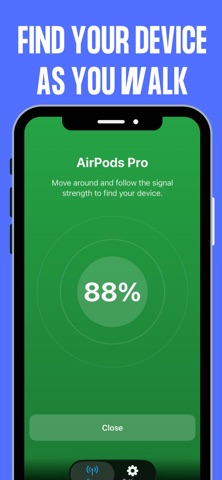
Stop wasting time searching for lost AirPods, headphones, and other Bluetooth devices. This app turns your phone into a simple, powerful Bluetooth device finder that helps you quickly track down nearby devices using a live signal strength meter.
Find Bluetooth devices like headphones, earbuds, earphones, speakers, fitness trackers, and more.
Locate devices such as AirPods and supported accessories using Bluetooth signal strength.
Watch the live signal meter go up as you walk closer to your lost device.
Simple, intuitive interface designed so anyone can start finding devices in seconds.
No complicated setup: open the app, scan, and follow the signal.
How it works:
1. Open the app and start scanning for Bluetooth devices around you.
2. Select the device you want to find from the list.
3. Walk around and watch the signal strength increase as you get closer.
4. When the signal is strongest, your device is nearby.
If you’ve ever asked yourself “Where are my AirPods?” or “How do I find my Bluetooth headphones?”, this app gives you a fast, easy answer so you can get back to what matters.
UPGRADE TO PRO: Upgrade to FindBud Pro to unlock unlimited device scans and the live signal radar for the best tracking experience.
Subscription Information:
- Title: FindBud Pro Weekly
- Length: 1 Week (includes a 3-day free trial)
- Price: $4.99 / week (Price may vary by location)
- Payment will be charged to your iTunes Account at confirmation of purchase. Subscription automatically renews unless auto-renew is turned off at least 24-hours before the end of the current period. Account will be charged for renewal within 24-hours prior to the end of the current period, identifying the cost of the renewal. You can manage or cancel your subscription in your App Store Account Settings after purchase. Any unused portion of a free trial period, if offered, will be forfeited when the user purchases a subscription.
Privacy Policy: https://findbud.my.canva.site/privacy-policy
Terms of Use (EULA): https://www.apple.com/legal/internet-services/itunes/dev/stdeula/