Q-Bridge: Quantum Workbench

Q-Bridge: Quantum Workbench Summary
Q-Bridge: Quantum Workbench is a free, with in-app purchases iOS app in Developer Tools by EUNMIN PARK. Released in Mar 2026 (7 months ago). Store last updated Oct 22, 2026
Q-Bridge: Quantum Workbench SDKs Summary
App not yet scanned for SDKs.
0★
Ratings: 0
Screenshots


App Description
Q-Bridge is a quantum job workbench for iPhone, iPad and Mac. It is built for developers and researchers who write quantum circuits, submit them, and want to see what happens next without switching between vendor consoles.
WHAT YOU CAN DO
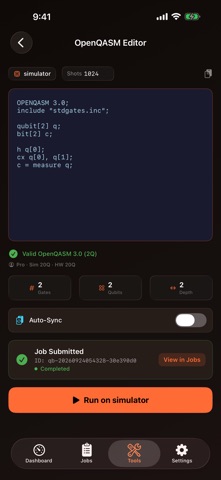
• Submit jobs — Pick a backend and submit a job from the Dashboard, or write and paste OpenQASM in the built-in editor (Pro).
• Follow every job in real time — Each job moves from queued to running to completed on screen as it happens. Your job list updates the moment a status changes, with no manual refresh.
• Emergency stop — One tap cancels all of your active jobs, and the app shows which jobs, if any, could not be stopped.
• Open real results — Finished simulator jobs return measurement counts you can inspect right away, together with the job's history and details.
• Cloud simulator — Circuits run on our cloud simulator (not on your device). The qubit limit depends on your plan, and the simulator is noiseless.
• Compare backends from seven providers (Pro) — Browse backends from IBM Quantum, IonQ, Rigetti, Quantinuum, PASQAL, QuEra and Amazon Braket side by side in one catalog.
• Bring your own provider credentials (Pro) — Provider API keys you add are stored in the Keychain on your device. No provider key is bundled with the app, and you never need one to use the simulator. They are sent only with requests that need them — the provider catalog or a job you submit to a provider.
• Backend suggestions on your device (Pro) — On supported devices, Bridge Advisor suggests a backend for your circuit using Apple's on-device model, so your circuit is not sent anywhere to get a suggestion.
• Bloch sphere — Visualize single-qubit states interactively, on every plan.
• Easy start — A short intro you can skip or replay from Settings, and a guest mode to look around before you create an account.
BUILT FOR APPLE PLATFORMS
A native app for iPhone, iPad and Mac, with Liquid Glass design. Universal Purchase: one subscription covers iPhone, iPad and Mac. Available in English, Korean, Japanese, Simplified Chinese, Spanish, French and German.
PRIVACY
No ads and no third-party tracking. The camera is used only when you choose to scan a QR code to pair a gateway. Provider keys stay in the Keychain. Creating an account requires you to be 13 or older.
PLANS
• Free — Cloud simulator jobs with li