SubStamp –Transcribe&Translate

SubStamp –Transcribe&Translate Summary
SubStamp –Transcribe&Translate is a free, with in-app purchases iOS app in Photo And Video by Lisen Huang. Released in Feb 2026 (8 months ago). It has 2.00 ratings with a 5.00★ (excellent) average. Based on AppGoblin estimates, it reaches roughly 3.00 monthly active users and generates around $<10K monthly revenue (100% IAP / 0% ads). Store last updated Apr 27, 2026
SubStamp –Transcribe&Translate SDKs Summary
App not yet scanned for SDKs.
5★
Ratings: 2.00
Screenshots



App Description
This app turns any video into a shareable version with clean, readable subtitles permanently burned in.
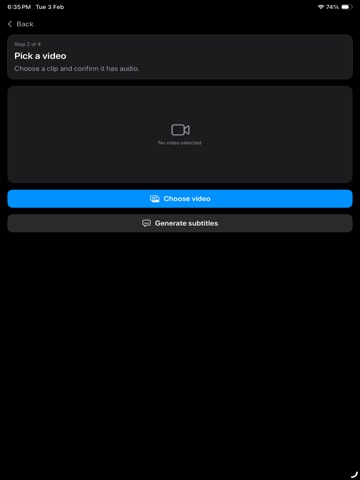
Select a video, choose the spoken audio language, and generate timed captions. Optionally add a second subtitle language to create bilingual subtitles, then export a new video that plays with subtitles everywhere—no special player required.
What you can do
• Speech-to-text transcription with timestamps
• AI-enhanced transcription option to improve punctuation, readability, and phrasing (when supported on your device)
• Translate subtitles to a second language when supported on your device
• Choose translation mode: Standard (faster) or AI (slower, usually more accurate and more natural)
• Burn one or two subtitle tracks directly into the video and export a new file
• Preview, edit, and fix captions before exporting
• Copy all subtitles in one tap (full transcript with timestamps) for notes, summaries, or re-use
Designed for a smooth, guided workflow
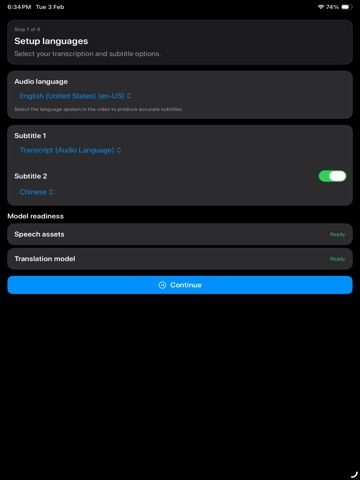
1. Choose the audio language for transcription.
2. Subtitle 1 (required) is the transcript in the audio language and is always enabled.
3. Subtitle 2 (optional) is a translated track. The app only shows translation options available for the selected audio language, and can fall back to translating via English when a direct pair isn’t available.
4. Generate subtitles, review them, and export.
Caption editing and readability
• Edit text, timing, line breaks, and segment boundaries so subtitles match your video
• Search within captions and jump to a time range to make fast fixes
• Adjust subtitle position (bottom, lower-third), safe-area margins, and font size
• Improve contrast with background box, shadow, or outline options
• Bilingual layout controls to keep two languages easy to read (stacked lines, spacing, alignment)
• Control maximum line length and wrapping behavior for cleaner captions
• Save style presets for consistent single-language or bilingual looks across projects
Export options
• Preserve the original audio
• Choose export quality and resolution where available
• Save the finished video to Photos or share it to other apps
Clear progress and reliability
Long jobs can take time depending on video length. The app shows progress for language readiness, transcription, translation (if enabled), rendering, and export, so you always know what’s happening. You