MyMusic - Offline Player

MyMusic - Offline Player Summary
MyMusic - Offline Player is a with in-app purchases iOS app in Music And Audio by Thibault Sanclemente. Released in Mar 2026 (7 months ago). Store last updated Sep 24, 2026
MyMusic - Offline Player SDKs Summary
App not yet scanned for SDKs.
0★
Ratings: 0
Screenshots




App Description
MyMusic is the audio player made for people who own their music. Import your MP3, FLAC, WAV, AIFF or M4A files from the Files app and play your whole collection offline, with no subscription and no connection.
Your library is organized automatically into albums, with an elegant full-screen player inspired by Apple Music.
KEY FEATURES
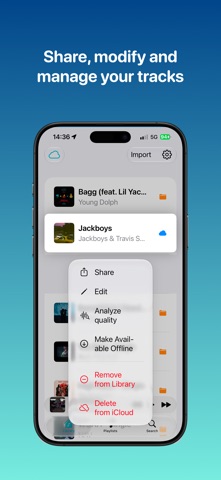
• Easy import: Add your tracks in seconds from any source (Files, AirDrop, share sheet).
• Offline playback: All your music is stored locally on your device. No connection required.
• iCloud sync: Sync your library across your Apple devices via iCloud Drive and make tracks available offline in one tap.
• Full album management: Edit artwork, titles, artists, year and copyright. Reorder tracks as you like.
• Track editing: Change the title, artist, artwork and metadata of each track.
• Playlists: Create custom playlists and browse your library by tracks, artists or albums.
• Search: Instantly find a track, an artist or an album.
• Clean player: Full-screen player with progress bar, playback controls, fast forward and rewind, and artwork display.
• Dark Mode: Interface adapts automatically to light and dark mode.
• Widgets: Show the current track and your playlists on your Home Screen.
• Audio formats: MP3, M4A, AAC, FLAC, ALAC, WAV, AIFF. Automatic lossless quality detection.
• Sharing: Share your tracks via AirDrop, Messages or any other app.
• Analysis: Check the true quality of any track. MyMusic decodes the sound and analyzes its spectrum to reveal what the file really is: genuine lossless, transparent compression, or fake lossless exposed. Long-press a track or a whole album to try it.
MYMUSIC PRO
Upgrade to MyMusic Pro to customize and enhance your listening (one-time purchase, no subscription):
• Themes and accent colors
• Alternate app icons — Bronze, Silver, Gold, Platinum and Diamond
• Sleep timer with a gradual fade-out
• Playback speed from 0.5× to 2×
• Crossfade — smooth transitions between tracks
MyMusic respects your privacy: no account required, no ads, no data collection.
Leave a rating and review on the App Store, it would help me a lot! Thanks for your feedback.