Glance - Home Screen Feeds

Glance - Home Screen Feeds Summary
Glance - Home Screen Feeds is a free, with in-app purchases iOS app in Productivity by Tal Kravarusic. Released in Mar 2026 (7 months ago). It has 4.00 ratings with a 5.00★ (excellent) average. Based on AppGoblin estimates, it reaches roughly 19 monthly active users and generates around $<10K monthly revenue (100% IAP / 0% ads). Store last updated Sep 9, 2026
Glance - Home Screen Feeds SDKs Summary
App not yet scanned for SDKs.
5★
Ratings: 4.00
Screenshots


App Description
Glance: Build, Follow & Share Widgets
Your apps. Your home screen.
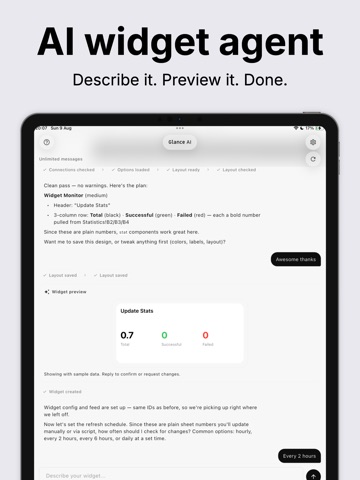
Glance turns the apps and services you care about into beautiful iPhone home screen widgets. Chat with Glance AI to build in seconds, subscribe to creator widgets, or design your own layouts. No laptop required.
WHAT IS GLANCE?
Glance connects your data to your home screen. Link Google Calendar, GitHub, YouTube, or on-device sources like Weather, Calendar, Reminders, and steps. Built-in automations keep widgets fresh.
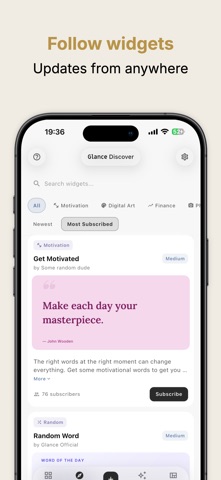
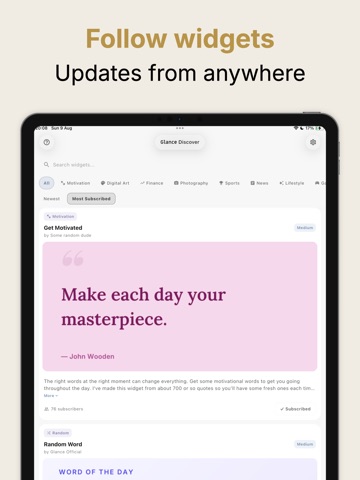
With Discover, browse public widgets, subscribe with one tap, and pin them to your home screen. Publish your own and share a link like glance.cool/your-name.
HOW IT WORKS
1. Build with Glance AI
Describe what you want in Chat. Glance AI designs the layout, connects your data, shows a live preview, and sets up updates. Reply to refine before anything goes live.
2. Connect & Automate
Link accounts in Integrations: Google, GitHub, YouTube, and native iPhone sources. Automations refresh on a schedule in the cloud or directly on your device.
3. Discover & Subscribe
Find widgets from creators in Discover. Subscribe, add to your home screen, and stay updated automatically.
4. Design Your Own
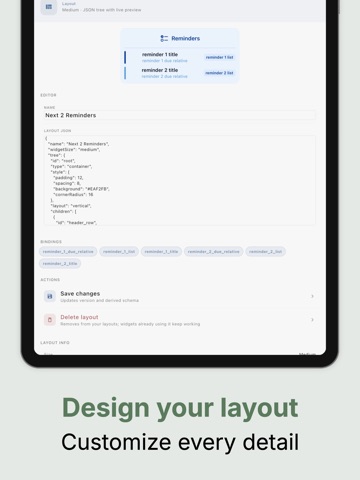
Use Layouts to edit custom designs with a JSON editor and live preview. Start from examples like GitHub Status or Activity & Calendar.
KEY FEATURES
• Glance AI: build widgets conversationally with inline previews
• Integrations: Google Calendar, Tasks, Sheets, GitHub, YouTube, and on-device Weather, Calendar, Reminders & Motion
• Automations: scheduled cloud refreshes or on-device updates
• Discover: subscribe to creator widgets or publish your own
• Custom Layouts: design appearance with a live editor
• Ready-Made Examples: one-tap templates for live widgets
• Webhook Feeds: push data via HTTP from scripts, Zapier, Make, or n8n
• Push Notifications: optional alerts when data changes
PERFECT FOR
• Daily stats: calendar, weather, fitness, and more
• Creators sharing live milestones via a link
• Developers monitoring GitHub, deployments, and server health
• Automation fans connecting scripts and tools
INTEGRATIONS
Available now: Google (Calendar, Tasks, Sheets), GitHub, YouTube, and on-device Weather, Apple Calendar, Reminders, and Motion & Fitness.
Coming soon: Meta (Instagram, Facebook Pages, Meta Ads), Strava, Spotify, and Gmail.
SUBSCRIPTION PLANS
Free
Up