Calendar Planner - PencilCal

Calendar Planner - PencilCal Summary
Calendar Planner - PencilCal is a free, with in-app purchases iOS app in Productivity by Brite Technologies. Released in Feb 2026 (6 months ago). It has 3.00 ratings with a 4.00★ (good) average. Based on AppGoblin estimates, it reaches roughly 16 monthly active users and generates around $<10K monthly revenue (100% IAP / 0% ads). Store last updated Apr 4, 2026
Calendar Planner - PencilCal SDKs Summary
App not yet scanned for SDKs.
4★
Ratings: 3.00
Screenshots


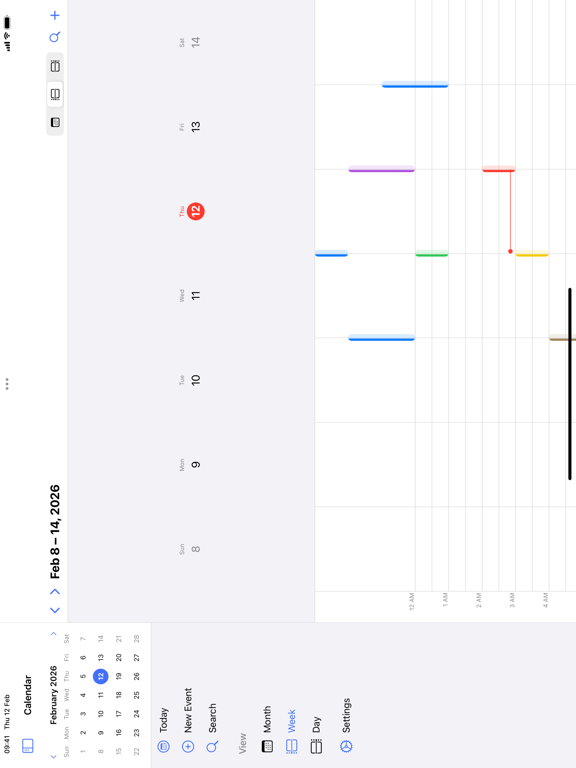
App Description
Calendar for iPad Pencil Plan — the most intuitive calendar app designed exclusively for iPad.
Draw events directly on the calendar with Apple Pencil. Just sketch a rectangle on the time grid, and your event is created instantly.
KEY FEATURES:
• Month, Week & Day Views — Beautiful, responsive calendar views optimized for iPad's large screen
• Apple Pencil Drawing — Create events by drawing on the time grid. Sketch rectangles, write text, and manage events with natural gestures
• Apple Calendar Integration — See all your iCloud, Google, and Exchange calendars in one place
• Year Overview — See your entire year at a glance with event indicators
• Agenda View — Upcoming events list for quick planning
• Recurring Events — Daily, weekly, monthly, yearly repeats with full customization
• Smart Notifications — Never miss an event with customizable reminders
• Event Quick Card — Draw a rectangle and instantly fill in event details
• Drag & Drop — Move events between time slots effortlessly
• Multiple Calendars — Create and manage unlimited local calendars with custom colors
• Dark Mode — Beautiful dark theme that's easy on the eyes
• Keyboard Shortcuts — Full keyboard navigation for power users
APPLE PENCIL GESTURES:
• Draw rectangle - Create event
• Write text - Create named event at that time
• Strike through - Delete event
• Circle around - Change event color
Designed with love for iPad. No iPhone version, no compromises — just the best calendar experience on the big screen.
---
Subscription Terms:
- Payment will be charged to your Apple ID account at confirmation of purchase
- Subscription automatically renews unless it is canceled at least 24 hours before the end of the current period
- Your account will be charged for renewal within 24 hours prior to the end of the current period
- You can manage and cancel your subscriptions in your App Store account settings
- Any unused portion of a free trial period will be forfeited when you purchase a subscription
Terms of Use: https://www.apple.com/legal/internet-services/itunes/dev/stdeula/
Privacy Policy: https://britetodo.com/legal/PrivacyPolicyBrite.pdf