PixMarker: Draw & Highlight

PixMarker: Draw & Highlight Summary
PixMarker: Draw & Highlight is a free, ad-supported, with in-app purchases iOS app in Tools by Bharti Verma. Released in Mar 2026 (5 months ago). It has 2.00 ratings with a 4.00★ (good) average. Based on AppGoblin estimates, it reaches roughly 12 monthly active users and generates around $<10K monthly revenue (27% IAP / 73% ads). Store last updated May 30, 2026
PixMarker: Draw & Highlight SDKs Summary
App not yet scanned for SDKs.
4★
Ratings: 2.00
Screenshots
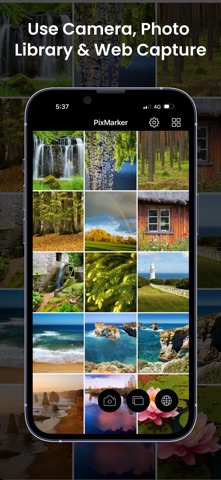


App Description
PixMarker: Draw & Highlight is an easy-to-use image markup and annotation tool for photos, pictures, screenshots, and webpage captures. Highlight important areas, draw shapes, add text, and create clear visual notes in seconds.
Whether you are working, studying, creating tutorials, or sharing ideas, PixMarker helps you turn any image, pic, photo, or browser page capture into clean and professional markups.
Features
• Draw and annotate with arrows, lines, circles, rectangles, and freehand tools
• Add text with font, color, size, shadow, and stroke options
• Highlight key areas with magnifier effects
• Blur or pixelate sensitive information
• Add numbers for better explanations
• Crop and rotate photos and pictures with easy controls
• Edit screenshots instantly with built-in markup tools
• Capture webpage or browser page screenshots and mark them up easily
• Mark up web snaps for tutorials, feedback, and visual notes
Perfect for
• Work feedback and presentations
• Study notes and tutorials
• Website, webpage, and map markup
• Social media content creation
• Creative projects and visual planning
Why PixMarker
• Fast and simple image annotation workflow
• Clear tools for highlighting and explaining ideas
• Great for professional and personal use
• All-in-one markup experience in one app
You can share your feedback by email, and for more details, visit our website.
• Website: https://pixmarker.tasakiapps.com
• Support Email: info@tasakiapps.com
Privacy Policy
https://pixmarker.tasakiapps.com/privacy-policy.html
Apple EULA
https://www.apple.com/legal/internet-services/itunes/dev/stdeula/
Download PixMarker: Draw & Highlight today and start creating clear, informative, and polished markups for your images, photos, pictures, and screenshots.