Cut Away Pro

Cut Away Pro Summary
Cut Away Pro is a free iOS app in Photo And Video by Marcus Kjellberg. Released in Jul 2026 (2 months ago). Store last updated Aug 21, 2026
Cut Away Pro SDKs Summary
App not yet scanned for SDKs.
0★
Ratings: 0
Screenshots

App Description
CutAway is the video trimmer that should have been built into iOS.
Trim your clips, merge them together, and export — without re-encoding. Free. No ads. No subscriptions. No watermarks. No bloat.
HEAR WHERE TO CUT
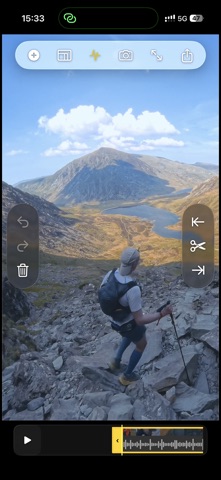
CutAway is the only lightweight video trimmer with audio scrubbing. Hear exactly where people start and stop talking, so you never cut mid-sentence. Combined with a visual waveform and silence detection, finding the perfect cut point takes seconds — not minutes.
SCRUB, TAP, DONE
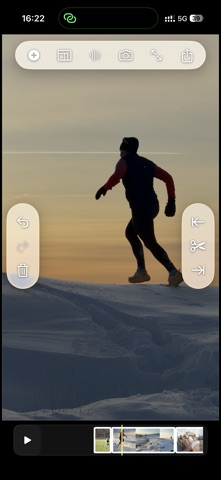
Scrub to where you want to cut, then tap Cut Left or Cut Right. Everything on that side disappears. No start and end points. No tiny handles. Just scrub, tap, done. It's 2–3x faster than any other trimmer.
INSTANT EXPORT, ORIGINAL QUALITY
Other trimmers re-encode your video — slow, lossy, and battery-draining. CutAway uses passthrough export: same resolution, same codec, same frame rate. For single clips, export is nearly instant.
MERGE WITHOUT COMPLEXITY
Shot 40 clips at the Eiffel Tower? Trim each one to the highlights, arrange them in order, and export one combined video. No multi-track timelines. No learning curve. Trim, merge, done.
CAPTURE THE PERFECT FRAME
Found the perfect moment? Export the current frame as a high-quality photo. Perfect for thumbnails, social media, or saving a memory.
PERFECT FOR
• Reclaiming storage — trim hours of footage to the good parts
• Trip & event highlights — combine a day's clips into one reel
• Drone footage — distill long flights to the best moments
• Quick shares — cut to the good part before sending
• Thumbnails — capture the perfect still frame
KEY FEATURES
• Audio scrubbing with waveform visualization
• One-tap Cut Left / Cut Right
• Split, delete, trim & reorder clips
• Precision scrubbing — pause your finger to zoom in
• Passthrough export (no re-encoding)
• Export full timeline, individual clips, or still frames
• 50-level undo/redo
• Pinch to zoom the timeline
• Works directly with your Photos library
• Non-destructive — originals never modified
• No ads. No watermarks. No third-party SDKs.
• Your data never leaves your device.