Spendo app

Spendo app Summary
Spendo app is a free, with in-app purchases iOS app in Lifestyle by Mahmoud Ahmed. Released in Mar 2026 (7 months ago). Store last updated Sep 2, 2026
Spendo app SDKs Summary
App not yet scanned for SDKs.
0★
Ratings: 0
Screenshots


App Description
Spendo – Smart Automated Expense Tracking
Spendo helps you take full control of your finances through intelligent automation and real-time insights.
Automatically detect and add expenses from transaction messages, categorize them instantly, and keep your budget updated — all powered by Apple Shortcuts integration.
No manual entry. No spreadsheets. Just smart financial clarity.
• Automatic Expense Detection
Spendo reads transaction messages and automatically logs expenses in the correct category.
• Smart Categorization
Advanced matching technology assigns each expense accurately and instantly.
• Voice Expense Logging
Add expenses in seconds using natural voice input.
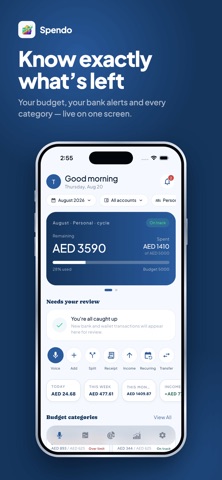
• Real-Time Budget Tracking
See your remaining balance, monthly limits, and category spending at a glance.
• Insights & Analytics
Visual reports for weekly, monthly, and yearly spending trends.
• Family & Group Mode
Manage shared budgets and switch between members in one powerful dashboard.
• Custom Spending Limits
Set category budgets and prevent overspending before it happens.
Subscriptions & In-App Purchases
Spendo offers auto‑renewable subscriptions through the Apple App Store. By subscribing, you agree to the following:
Available Plans & Product IDs
Individual
- Monthly: com.mag.spendo.individual.monthly
- Yearly: com.mag.spendo.individual.yearly
Family
- Monthly: com.mag.spendo.family.monthly
- Yearly: com.mag.spendo.family.yearly
Family Plus
- Monthly: com.mag.spendo.family_plus.monthly
- Yearly: com.mag.spendo.family_plus.yearly
Subscriptions automatically renew unless canceled at least 24 hours before the end of the current period. You can manage or cancel your subscription in your device’s App Store settings.
By using the app, you also agree to Apple’s Standard End User License Agreement (EULA): https://www.apple.com/legal/internet-services/itunes/dev/stdeula/