Export Contacts Pro: Backup

Export Contacts Pro: Backup Summary
Export Contacts Pro: Backup is a free, with in-app purchases iOS app in Tools by OLEKSANDR VASETSKYI. Released in Mar 2026 (7 months ago). Store last updated Mar 14, 2026
Export Contacts Pro: Backup SDKs Summary
App not yet scanned for SDKs.
0★
Ratings: 0
Screenshots



App Description
Here's the cleaned version with all trademarks removed:
Finally, a contacts export app that does it properly.
Your phone gives you a VCF file buried in settings. ContactsExport gives you a clean spreadsheet, a properly formatted CSV, or a vCard file — with every field intact, in seconds.
Why people choose ContactsExport:
Switching phones, migrating to a new CRM, sending a client list to your team, or simply backing up years of contacts before something goes wrong — ContactsExport handles all of it cleanly.
Full field control
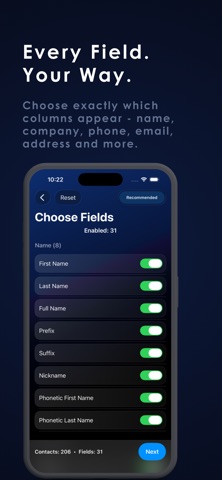
Choose exactly which columns appear in your export — name, company, phone, email, address, birthday, notes, and more. No missing fields. No surprises. Every contact field on your device is available to export.
Three formats, all done right
Excel (.xlsx) — opens in any spreadsheet app. CSV — imports directly into any CRM, database, or marketing tool. vCard (.vcf) — the universal format for moving contacts between devices and apps.
One-time purchase — no subscription
Pay once, export as many times as you want, forever. No weekly billing. No artificial limits after a trial period. No ads.
Private by design
Your contacts never leave your device. All processing happens locally. Nothing is uploaded, stored, or analyzed on any server.
Perfect for:
— Switching phones or moving to a new device
— Exporting client or sales contacts to a spreadsheet or CRM
— Creating a backup before changing accounts
— Sharing a contact list with your team
— Recovering contacts after an account is deleted or locked
How it works:
Select all contacts or choose specific groups
Pick which fields to include in your export
Choose your format — Excel, CSV, or vCard
Share via email, cloud storage, or any app
Free version exports up to 50 contacts. Unlock unlimited with a one-time purchase.
ContactsExport requires access to your contacts to create your export file. This access is used exclusively for export — your data is processed on-device and never transmitted anywhere.
Privacy Policy: https://www.notion.so/ContactsExport-Privacy-Policy-31424021e4ad803e9f31c5ba8aa1bd3f
Terms of Use: https://www.apple.com/legal/internet-services/itunes/dev/stdeula/