Carousel Collage - Post Maker

Carousel Collage - Post Maker Summary
Carousel Collage - Post Maker is a free, with in-app purchases iOS app in Photo And Video by Shamble, Inc.. Released in Sep 2026 (recently released ago). It has 3.00 ratings with a 5.00★ (excellent) average. Based on AppGoblin estimates, it reaches roughly 88 monthly active users and generates around $<10K monthly revenue (100% IAP / 0% ads). Store last updated Sep 17, 2026
Recent activity: 1.00 new ratings this week View trends →
Carousel Collage - Post Maker SDKs Summary
App not yet scanned for SDKs.
5★
Ratings: 3.00
Screenshots


App Description
Create Instagram carousels people actually swipe through.
Carousel Collage is an all-in-one app for creating aesthetic carousels, collages, stories, and seamless swipeable posts.
Choose from hundreds of templates and express your creativity with powerful editing tools in minutes. Built for content creators, influencers, and storytellers.
FEATURES
• Seamless Carousel Maker
Create seamless Instagram carousels and swipe-ready posts that flow naturally from slide to slide. Perfect for photo dumps, tutorials, or storytelling posts. Align photos, text, and design elements across pages to make your posts stand out.
• Creative Collage Maker
Design stunning photo collages with clean grids, freeform layouts, and layered designs. Turn your camera roll into visual stories—from minimalist photo grids to bold creative compositions people want to explore.
• Aesthetic Templates
Choose from hundreds of carefully crafted, fashion-forward templates — editorial, minimalist, scrapbook, recap, film, and more. Fresh styles are added regularly to keep your content polished, inspiring, and always on trend.
• Massive Frames & Grids Layouts
Explore a huge library of frames and grid layouts for every scene and creative need. Place your photos in digital, camera, film, collage, and aesthetic frames, or choose from classic grids, geometric shapes, and dimensional layouts.
• Extensive Stickers & Fonts
Discover a wide range of stickers and fonts crafted by our designers. From elegant serifs and handwritten scripts to playful decorative fonts and trendy stickers, you'll always find the perfect finishing touches for your content.
• Powerful Cutout Tools
Remove backgrounds with highly accurate AI cutouts in a single tap. Effortlessly extract people, objects, and products from your photos, then place them anywhere in your design. Also supports manual brush and shape cutouts for even greater creative flexibility.
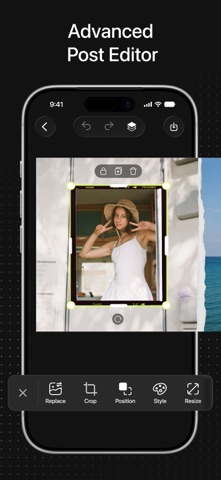
• Precision Editing
Fine-tune every detail beyond basic moves, rotations, scaling, and cropping. Adjust pixel-perfect positioning, opacity, and more to ensure every element looks exactly the way you want.
• All-in-One Creative Studio
Work with 20+ photos in a single project. Apply filters and styles, manage layers, and customize layouts with ease. Everything you need, all in one app.
Whether you're creating recaps, travel journals, tutorials, product laun