Q-Shield Sentinel - QRS Score

Q-Shield Sentinel - QRS Score Summary
Q-Shield Sentinel - QRS Score is a free, with in-app purchases iOS app in Tools by EUNMIN PARK. Released in Apr 2026 (6 months ago). Store last updated Oct 2, 2026
Q-Shield Sentinel - QRS Score SDKs Summary
App not yet scanned for SDKs.
0★
Ratings: 0
Screenshots



App Description
Q-Shield Sentinel: post-quantum readiness, honestly assessed.
A customer sent you a post-quantum readiness questionnaire? Q-Shield drafts answers only where your own assessment or scan records back them, cites the record for each, and leaves the rest blank or marked for your direct answer.
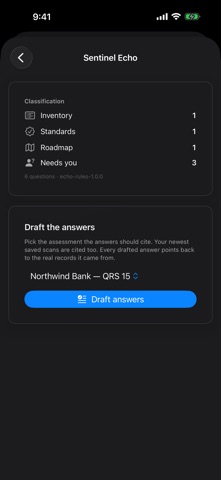
SENTINEL ECHO — ANSWER THE QUESTIONNAIRE YOU WERE SENT
• Paste it or import a text file. Echo sorts each question: cryptographic inventory, standards and compliance, migration roadmap, crypto-agility or suppliers.
• It drafts an answer only where your assessment or saved scans back it, and each answer cites that record, so you can check it before sending.
• Unsupported questions come back blank, with the reason. Pricing, contract, SLA and supplier questions are marked "only you can answer this."
• Not AI: fixed rules — the same questionnaire always gives the same result.
• Keys, certificates or passwords pasted by mistake are caught on your device before upload.
• Export the answers as a document.
QRS 5-AXIS QUANTUM-RISK ASSESSMENT
Three short steps give you a 0–100 Quantum Resilience Score across five weighted axes: algorithm vulnerability, key-length safety, migration readiness, data exposure and compliance gap. Each result shows the algorithms most at risk, a radar chart, a prioritized roadmap to the NIST post-quantum standards (ML-KEM, ML-DSA, SLH-DSA), your Q-Day estimate and harvest-now-decrypt-later (HNDL) exposure, and an optional key-rotation check (Ghost-Key). Each result also states its scoring-method version and the basis of its numbers (your inputs, a model estimate or a what-if scenario).
ASSESSMENT REPORT (Professional and Enterprise)
A 22-page PDF Simulation Assessment Report. The app shows its report ID, page count and the SHA-256 fingerprint of the downloaded file.
SENTINEL
Shows how fresh each of five sources is: NIST, the GRI threat timeline, arXiv, your domain and your last assessment. Force Refresh never counts against your monthly assessments.
WAR ROOM AND SIRI
• HNDL threat map (figures: Professional and Enterprise), labelled as a model estimate, not measured traffic.
• Shor penetration simulator (Professional and Enterprise): eight attack-vector scenarios against your declared algorithms, with the weakest link.
• Siri: security health check, threat explanation, audit log — status only, never secrets.
A SIMULATION, N