Authenticator: 2FA Auth & MFA

Authenticator: 2FA Auth & MFA Summary
Authenticator: 2FA Auth & MFA is a free, with in-app purchases iOS app in Tools by .ARSAN SOFIA LARSAN. Released in Apr 2026 (5 months ago). It has 2.00 ratings with a 5.00★ (excellent) average. Based on AppGoblin estimates, it reaches roughly 12 monthly active users and generates around $<10K monthly revenue (100% IAP / 0% ads). Store last updated Jun 1, 2026
Authenticator: 2FA Auth & MFA SDKs Summary
App not yet scanned for SDKs.
5★
Ratings: 2.00
Screenshots

App Description
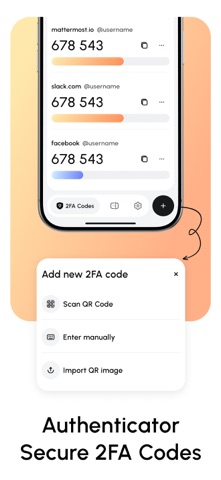
Keep your digital life secure with Authenticator — the easiest way to manage two-factor authentication (2FA) and multi-factor authentication (MFA) on your iPhone. Protect your accounts with a simple, fast, and reliable app that works seamlessly with Google, Microsoft, Facebook, and hundreds of other services.
Key Features:
* Secure 2FA & MFA Codes: Generate time-based codes locally, keeping your accounts safe from hacks.
* Cross-Platform Sync: Access your accounts on all your devices safely.
* Face ID & Touch ID Support: Quick and secure login with biometric authentication.
* Backup & Restore: Never lose access to your accounts when switching devices.
* Customizable Accounts: Organize your accounts with labels, colors, and icons for quick access.
Perfect for anyone who values privacy and security, Authenticator puts your safety first. Download now and take control of your digital security today!
Note: Full access to all features requires a paid subscription.
Subscription Information:
- Payment. Charges apply to your iTunes Account at purchase confirmation.
- Auto-Renewal. Subscriptions renew automatically unless canceled at least 24 hours before the current period ends.
- Renewal Charges. Your account will be charged for renewal within 24 hours prior to the end of the current period, based on the selected plan.
- Manage Your Subscription. Go to your Account Settings after purchase to handle auto-renewal and other preferences.
Privacy Policy - https://justpaste.it/mufm4
Terms Of Use - https://justpaste.it/icgrc