Luna: White Noise Sleep Sounds

Luna: White Noise Sleep Sounds Summary
Luna: White Noise Sleep Sounds is a free, with in-app purchases iOS app in Health And Fitness by Nataliia Litvinova. Released in Mar 2026 (6 months ago). It has 39 ratings with a 4.59★ (excellent) average. Based on AppGoblin estimates, it reaches roughly 223 monthly active users and generates around $<10K monthly revenue (100% IAP / 0% ads). Store last updated Sep 24, 2026
SDK intelligence: AppGoblin detected 3 development tools(e.g. Google), 2 ad networks, 1 analytics: product,and 1 business tools integrated into Luna: White Noise Sleep Sounds. View full SDK list →
Luna: White Noise Sleep Sounds SDKs Summary
Luna: White Noise Sleep Sounds was last scanned for SDKs on 2026-10-02. Below is the overview of third-party companies detected in the app. The full list of SDKs, permissions and unknowns is available here.
 Google
 Facebook
 Airbnb Engineering
 nanopb
 Firebase
 RevenueCat
4.59★
Ratings: 39
Screenshots

App Description
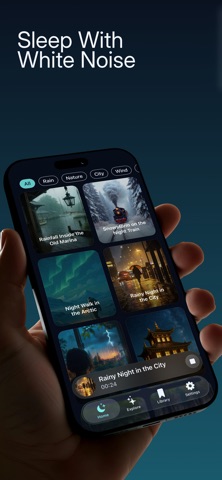
Create a calmer space for bedtime, focus or a quiet break with Luna. Choose white noise, fan, rain and nature sounds, then build a mix that feels right for you.
YOUR SOUNDS, YOUR BALANCE
Combine multiple sounds and adjust each layer independently. Turn a sound up, lower it or mute it, then save your favorite mixes so they are easy to find again.
FIND YOUR EVERYDAY BACKGROUND
Explore white, brown, green and pink noise alongside rain, ocean, thunder and ambient sounds. Set the mood for reading, working, winding down or settling into your evening routine.
A SIMPLE BEDTIME ROUTINE
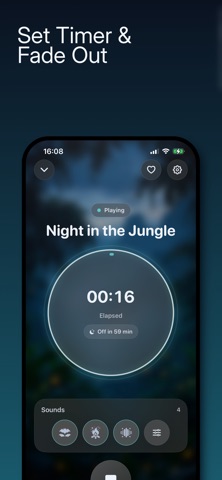
Choose your mix, set a sleep timer and let playback stop automatically. Add a gradual fade-out for a softer end to your listening session.
MAKE IT YOURS
• Mix several sounds at once
• Adjust or mute individual layers
• Save favorite mixes for quick access
• Set a timer to stop playback
• Fade out gradually as the timer ends
Start with one sound or create your own combination. Keep the balance you like and return to it whenever you want a quieter moment.
Some content and features may require a subscription.