Editable: AI Photo Editor

Editable: AI Photo Editor Summary
Editable: AI Photo Editor is a free, ad-supported, with in-app purchases iOS app in Photo And Video by RAY INFORMATICS YAZILIM TEKNOLOJI MEDYA DANISMANLIK VE EGITIM TICARET LIMITED SIRKETI. Released in May 2026 (5 months ago). It has 4.00 ratings with a 4.24★ (good) average. Based on AppGoblin estimates, it reaches roughly 23 monthly active users and generates around $<10K monthly revenue (74% IAP / 26% ads). Store last updated Sep 23, 2026
Editable: AI Photo Editor SDKs Summary
App not yet scanned for SDKs.
4.24★
Ratings: 4.00
Screenshots


App Description
Turn any photo into the photo you actually wanted — just by typing. Say goodbye to ordinary photo editors, and hello to Editable: the AI photo editor that listens. A different outfit, a new background, a polished headshot, a pose you couldn't get on camera, a blurry shot you wish was sharp — describe it, tap once, and watch it happen.
REALISTIC AI EDITS THAT NO ONE CAN TELL
If you're expecting heavy filters or an obvious AI overlay, think again. Editable doesn't paste effects on top of your picture — it reimagines the photo itself, keeping you looking like you, only better. Smooth skin that keeps your freckles. A pose you didn't think to strike. Every result is a natural, finished photo — so real that even you won't believe AI did the job.
NOT YOUR REGULAR PHOTO EDITING APP
You don't think in sliders — you think in sentences. "Make the light warmer." "Smooth my skin but keep my freckles." "Swap this jacket for a navy blazer." Editable understands what you're asking for and returns a natural, finished result. Keep it, or refine it with another prompt until it's exactly right.
HOW DOES IT WORK?
Open a photo. Type the edit. See your result in seconds. No tutorials, no filter hunting, no design skills. Just say what you want — Editable does the rest.
WHAT YOU CAN DO WITH EDITABLE
- AI Pose Generator: Strike the pose after the shot — the angle, the energy, the attitude
- 4K Upscale: Sharpen, unblur, and enlarge any photo up to 4K — old photos, low-light shots, screenshots
- AI Reframe: Wrong framing? Zoom out, recenter, or open up the scene — after the photo is taken
- AI Skin Retouch: Even skin tone, fewer blemishes and acne, zero plastic look — retouching by sentence, not by slider
- AI Headshots: Type the role, get the shot — business-ready portraits for work profiles, resumes, and dating apps
- AI Outfit Try-On: Type a look like "navy blazer, white shirt, dark jeans" and see yourself in it
- AI Couple Photos: Merge two photos into one realistic shared scene
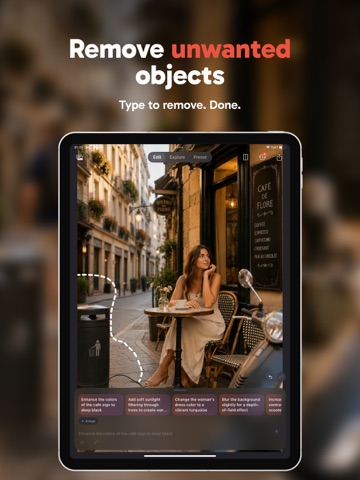
- Magic Cleanup: Remove bystanders, watermarks, or anything unwanted — AI fills in what was behind
- AI Color Grading: Grade with a prompt, or fine-tune warmth, contrast, saturation, and grain
- Trend Generators: Action figures, anime, instant-film throwbacks, 90s yearbook, baby photos — refreshed weekly
EDITABLE IS PERFECT FOR
Selfies that finally look like you on your