TransPeek

TransPeek Summary
TransPeek is a free, with in-app purchases iOS app in Tools by 上海百隅信息科技有限公司. Released in Mar 2026 (7 months ago). It has 6.00 ratings with a 4.33★ (good) average. Based on AppGoblin estimates, it reaches roughly 100 monthly active users and generates around $<10K monthly revenue (100% IAP / 0% ads). Store last updated Sep 19, 2026
TransPeek SDKs Summary
App not yet scanned for SDKs.
4.33★
Ratings: 6.00
Screenshots


App Description
Read any screen in your own language — games, videos, comics, chats and websites, without leaving the app you're in.
TransPeek floats a small window over whatever you're doing, reads the text on screen and shows the translation right there. Text recognition and translation both run on your device.
FLOATING WINDOW
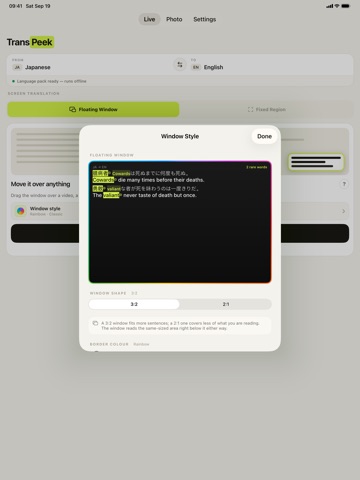
Drag the window over the text you want to read. It translates what sits just below it, sentence by sentence, with the original line above each translation, so you can read both at once. Move it and it follows along.
RARE WORDS, MARKED FOR YOU
Learning a language? TransPeek marks the less common words in each sentence and highlights the matching words in the translation, numbered so you can pair them up. Set your reader level for each language and it only marks what you're likely not to know yet.
FIXED REGION
For subtitles, game dialogue or speech bubbles that always appear in the same place: mark those areas once and TransPeek keeps translating them. The window takes the shape of what you marked — wide and short for a subtitle strip, tall for a column of bubbles.
PHOTO TRANSLATION
Take a photo or pick one from your library — menus, signs, letters, product labels — and translate the text in it. Photos never leave your device.
SHORTCUTS, SIRI AND CONTROL CENTER
Start the floating window or a fixed region from Control Center, Siri, Spotlight or the Shortcuts app. Pair "Take Screenshot" with "Translate Screenshot" to translate whatever is on screen with one tap; on iOS 26, with the language already downloaded, the result appears without leaving the app you're in.
20 LANGUAGES, ANY PAIR
English, Simplified Chinese, Traditional Chinese, Japanese, Korean, French, German, Spanish, Portuguese (Brazil), Russian, Italian, Thai, Vietnamese, Arabic, Dutch, Hindi, Indonesian, Polish, Turkish and Ukrainian — translate between any two. Translation is powered by Apple's on-device engine; once a language is downloaded, it works offline.
PRIVATE BY DESIGN
No account, no cloud and no tracking. Your screen is processed on your iPhone or iPad and is never uploaded.
MAKE IT YOURS
Choose the window's shape, border colour and text theme. Every translation is kept in your history on this device, with stats for the week.
PRICING
Try everything free for 3 days. The trial starts with your first screen translation, not when you install. After that, a one-time