PicCalculator

PicCalculator Summary
PicCalculator is a mobile iOS app in Photo And Video by Mark David. Released in Mar 2026 (7 months ago). Store last updated Oct 3, 2026
PicCalculator SDKs Summary
App not yet scanned for SDKs.
0★
Ratings: 0
Screenshots



App Description
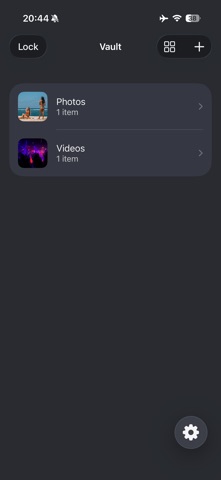
PicCalculator is a private, encrypted on-device vault for your personal photos, videos and files.
Import media in full resolution - without the app downsizing or compressing your files, keep everything organised with folders and lock it behind your own passcode. Your files are encrypted inside the vault on your device and you can export items back to Photos, Files or share them whenever you choose.
Features:
* Encrypted local storage for photos, videos and files
* Import media in full quality and full resolution
* Organise everything with custom folders
* Rename items and move them between folders without creating duplicates
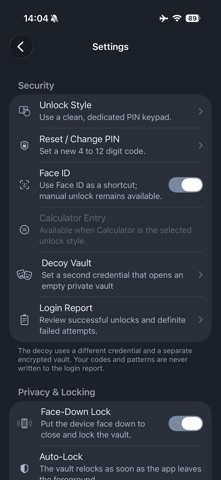
* PIN, dot-pattern and calculator-code unlock options
* Take images and video from within the app so nothing goes to photos app
* Face ID and Touch ID support
* Import files and folder contents from the Files app
* Login attempts logging with the latest 50 entries
* iTunes / Finder import / export
* Wi-Fi import / export with approval on your phone
* Choose which files and folders are available for Wi-Fi downloads
* Fully working Calculator-style cover screen for a discreet look
* Passcode protection with quick relock
* Optional face-down locking
* Separate encrypted decoy vault with its own unlock credential
* Increasing wait times after repeated incorrect unlock attempts
* Fresh authentication before changing your passcode or pattern
* Stronger checks against altered encrypted files
* Improved temporary-preview cleanup when the vault locks
* Thumbnails for easy browsing, with list and larger square views
* Zoom, pan and double-tap zoom for photos and videos
* Crop, rotate and flip photos, saving changes without keeping duplicate versions
* Swipe to rename, delete or export items
* Save back to Photos, Files or share externally
* Alternate app icon styles
* Clean, simple private gallery experience
Your media stays under your control: Stored locally on device, Encrypted inside the vault and Exported only when you choose.
No ads, just protection.