JSON Viewer and Editor

JSON Viewer and Editor Summary
JSON Viewer and Editor is a free iOS app in Productivity by Sahana A S. Released in Mar 2026 (7 months ago). Store last updated Oct 6, 2026
JSON Viewer and Editor SDKs Summary
App not yet scanned for SDKs.
0★
Ratings: 0
Screenshots



App Description
Open, inspect, edit and repair JSON files on your iPhone or iPad. JSON Viewer and Editor works offline, requires no account and keeps your documents on your device.
VIEW JSON CLEARLY
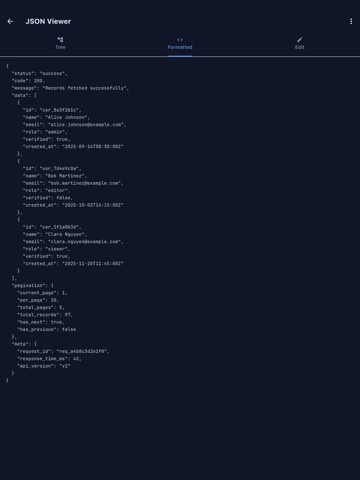
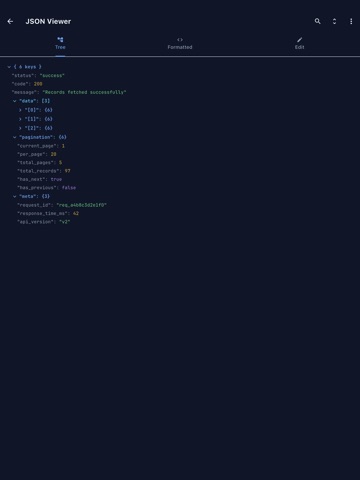
Browse objects and arrays in an expandable tree, search values and follow breadcrumb paths through deeply nested data. Switch to formatted code with syntax highlighting and line numbers whenever you need the raw document.
EDIT AND REPAIR
Edit JSON in the text editor or change values directly from the tree. Add, delete, duplicate and reorder nodes. JSON Fixer can repair common problems such as trailing commas, missing quotes and unquoted keys.
COMPARE FILES
Open two documents side by side and inspect additions, deletions and changed values. Import from Files, paste text or fetch JSON from a URL.
VALIDATE AND QUERY
Validate documents against JSON Schema Draft 7 and see useful error locations. Run JSONPath expressions and inspect matching values immediately.
CONVERT AND EXPORT
Convert JSON to YAML, CSV, XML or key-value text. Export results to PDF or Excel, save them to Files, print them or share them with another app.
API AND HAR TOOLS
Send GET, POST, PUT, PATCH and DELETE requests with custom headers and bodies. Inspect response status, timing and size, then open the response in the JSON viewer. HAR files open with a request summary for easier debugging.
BUILT FOR REAL FILES
• Open JSON documents directly from the Files app
• Search, sort and navigate nested data
• Resume your previous session
• Save frequently used documents as favorites
• Start from ready-made JSON templates
• Use dark or light appearance
• Work in 15 supported interface languages
The free version includes the core viewer, formatter and editor and is supported by advertising. A one-time Pro purchase removes advertising and unlocks unlimited tabs, JSON Compare, schema validation, the API client and advanced conversion and export tools. There is no subscription.
PURCHASES
• JSONVEdit Pro Lifetime — $9.99, one payment
• Payment is charged to your Apple Account at confirmation of purchase
• One-time purchase — no subscription and no renewals
Terms of Use (EULA): https://www.apple.com/legal/internet-services/itunes/dev/stdeula/
Privacy Policy: https://cosmovex.web.app/apps/jsonvedit/privacy-policy