Invoice Suite: Invoices & More

Invoice Suite: Invoices & More Summary
Invoice Suite: Invoices & More is a free, with in-app purchases iOS app in Finance by Beshoy Nabil. Released in Mar 2026 (8 months ago). Store last updated Mar 22, 2026
Invoice Suite: Invoices & More SDKs Summary
App not yet scanned for SDKs.
0★
Ratings: 0
Screenshots




App Description
Invoice Suite puts professional invoicing and simple business reporting in your pocket. Create and send invoices and estimates, manage clients, record payments, and see how your business is doing—without spreadsheets or complicated software.
INVOICES & ESTIMATES
• Create invoices and estimates with line items, quantities, and unit prices
• Apply tax per line or use your default tax rate
• Set issue and due dates; track status: draft, sent, paid, overdue, or cancelled
• Record payments (amount, date, method) and keep a full payment history
• Convert estimates to invoices in one tap
• Optional payment link on each invoice
PROFESSIONAL PDFs
• Generate PDFs from your invoices and estimates
• Choose from multiple templates: Classic, Minimal, Bold, Modern, Elegant, Compact, Professional
• Preview before sharing; share via Mail, Messages, or any app
• Add your company logo and signature on PDFs (Pro)
CLIENTS
• Store client name, email, phone, address, company name, and tax ID
• Attach clients to invoices and estimates; see client details from any invoice
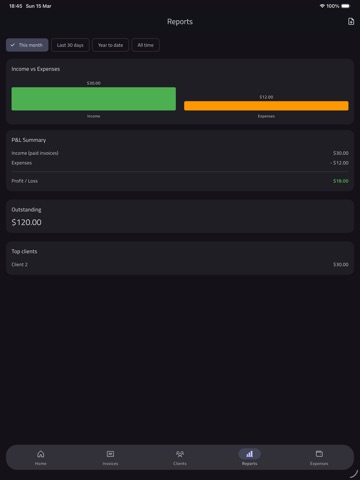
REPORTS
• Dashboard with outstanding total, overdue count, and recent invoices
• Income vs expenses with date ranges: This month, Last 30 days, Year to date, All time
• P&L summary: income (paid invoices), expenses, profit/loss
• Outstanding and overdue amounts; top clients by revenue
• Export reports as CSV to share or use in other tools
EXPENSES (Pro)
• Track expenses with category, amount, date, and notes
• Attach receipt photos from camera or gallery
• Categories include: Bank fees, Equipment, Marketing, Meals, Office, Rent, Software, Travel, and more
• Expenses feed into reports for a full picture of income vs spending
SETTINGS & SECURITY
• Company profile: name, email, phone, address for PDFs
• Currency: choose from many supported currencies (USD, EUR, GBP, etc.)
• Default tax rate and invoice number prefix
• Payment details (e.g. bank account, transfer instructions) printed on PDFs
• Light, dark, or system theme
• App lock: require Face ID, Touch ID, or device PIN when returning to the app
• Backup: export all data to a JSON file; restore from a previous backup on this or another device
FREE VS PRO
• Free: Create up to 3 invoices and 3 clients; use selected PDF templates; ads may be show
Data also available via the AppGoblin MCP and API (/api/v1/apps/{store_id}).