Repeating Alarm Clock: Weekly

Repeating Alarm Clock: Weekly Summary
Repeating Alarm Clock: Weekly is a free, ad-supported, with in-app purchases iOS app in Tools by Shota Yamashita. Released in Apr 2026 (6 months ago). It has 4.00 ratings with a 4.75★ (excellent) average. Based on AppGoblin estimates, it reaches roughly 40 monthly active users and generates around $<10K monthly revenue (73% IAP / 27% ads). Store last updated Sep 13, 2026
Repeating Alarm Clock: Weekly SDKs Summary
App not yet scanned for SDKs.
4.75★
Ratings: 4.00
Screenshots


App Description
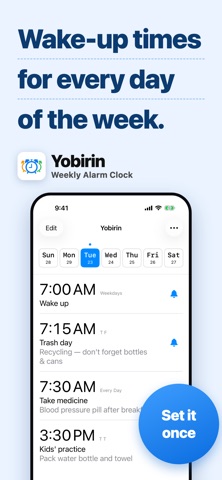
Yobirin is a simple alarm app that lets you set different alarms for each day of the week.
Tired of resetting tomorrow's alarm every single night? Yobirin takes that small daily stress off your hands.
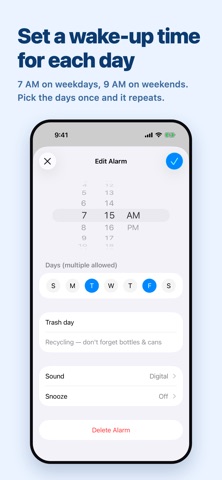
Set your alarms once, and they repeat automatically every week.
"Wake up early on Mondays, sleep in on weekends."
"Garbage day reminders for Mon/Wed/Fri — and don't forget the things I always forget."
"Tuesday night only — can't miss my favorite show."
Whatever your weekly rhythm looks like, automate it with a single setup.
Built on the same system as the iPhone's built-in alarm, with the flexibility of day-by-day customization.
Main Features
■ Day-by-day alarm settings
Save different times, sounds, and snooze settings for each day of the week. Set once, and it repeats every week automatically.
■ Smart per-day skip
Need to skip just this week's alarm? Easy. Skipped alarms automatically turn back on next week, so you'll never forget to re-enable them.
■ Bulk alarm controls
On a holiday or going on a trip? With one tap, skip or turn off all of today's alarms.
■ Labels & notes
Show labels like "Pack lunch" or "Take meds" on your alarms. Notes are visible right from the alarm list.
■ Current time bar
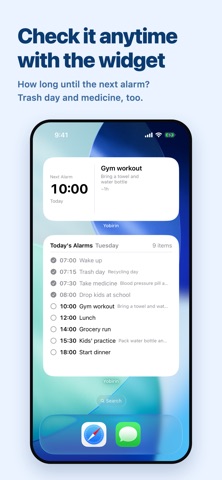
See at a glance how close you are to the next alarm — visualize your day's progress.
■ Customizable week start
Choose which day starts your week to match your lifestyle.
■ OS-level alarm notifications
Built on the same system as the iPhone's standard alarm, your alarms ring reliably even in the background.
■ Full iPad support
- A layout built for the larger screen, so your weekly alarm list has room to breathe
- Works in both portrait and landscape
- Supports Split View and Slide Over — keep your alarm list beside another app
- Add the same alarm widgets to your Home Screen as on iPhone
■ Apple Watch app
Check and control alarms right from your wrist — no need to take out your iPhone.
- See your next alarm and the full weekly list on Apple Watch
- Tap to cycle through "On → Skip → Off"
- Bulk actions like "Skip today" and "Turn all off" right from your wrist
- Real-time sync with iPhone keeps everything up to date
■ Apple Watch complications
Add Yobirin to your watch face in various complication sizes.
- "Next Alarm" widget shows your upcoming alarm
- "Today's Alarms" widget lists today's schedule
Glance at your wrist to s