Habits: Stay Consistent

Habits: Stay Consistent Summary
Habits: Stay Consistent is a mobile iOS app in Productivity by Vlad Zhila. Released in Mar 2026 (6 months ago). Store last updated Mar 25, 2026
Habits: Stay Consistent SDKs Summary
App not yet scanned for SDKs.
0★
Ratings: 0
Screenshots


App Description
Habits is a simple, minimalistic habit tracker designed to help you build consistency. Whether you're starting a morning routine, hitting the gym, meditating, or reading more, Habits gives you the tools to stay on track.
Buy once, keep forever. No subscription. No ads. No account required.
---
CREATE HABITS
Add your habits in seconds. Pick a name, icon, color, schedule, and a motivational description to keep you inspired — and you're ready to go. Create as many habits as you want — no limits.
HEATMAPS & STREAKS
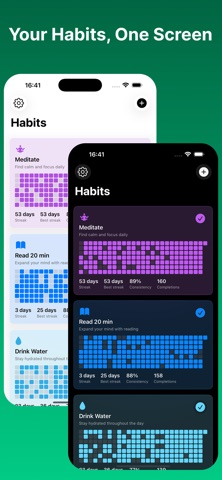
Every habit card shows a heatmap so you can see your consistency at a glance. Watch your current streak grow, track your best streak, and monitor your consistency percentage. The more you show up, the more colorful your dashboard becomes.
FLEXIBLE SCHEDULING
Not every habit is a daily habit. Choose the schedule that fits your life:
• Daily — every single day
• Weekly — target a number of days per week
• Monthly — target a number of days per month
• Interval — every N days (great for rest days or rotating tasks)
HOME SCREEN WIDGETS
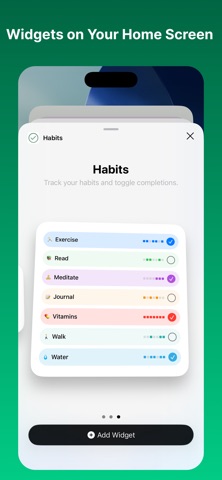
Keep your habits front and center with small, medium, and large Home Screen widgets. Mark habits done right from your Home Screen — no need to open the app. Medium and large widgets show 7-day heatmap dots so you can track your week at a glance.
CALENDAR
Tap into a full calendar view to review your history and edit past completions. Forgot to check off yesterday? Just tap the day and you're done.
REMINDERS
Set per-habit push notifications with customizable times and weekday schedules. Get reminded exactly when it matters — never miss a completion again.
MAKE IT YOURS
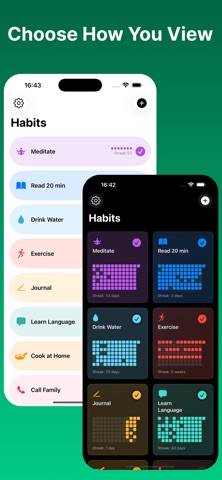
Personalize every detail — pick from colors and thousands of emoji and icons. Switch between single column, two-column grid, or compact list layout. Choose your week start day, set light or dark appearance, and drag-and-drop to reorder. Need inspiration? Browse 100+ suggested habits to get started.
MINIMALIST MODE
Prefer a clean, distraction-free look? Use black and white colors, hide icons, and switch to compact list layout for a truly minimal experience.
ARCHIVE
Taking a break from a habit? Archive it to keep your dashboard clean and restore it anytime.
IMPORT & EXPORT
Back up your habits to a file anytime. Moving to a new phone? Just import the file and pick up where you left off.
PRIVATE BY DESIGN
Your data belongs to y