XeNo: AI Files Assistant

XeNo: AI Files Assistant Summary
XeNo: AI Files Assistant is a free iOS app in Productivity by DARWIN TECHNOLOGY L.L.C. Released in Aug 2026 (2 months ago). It has 1.00 ratings with a 5.00★ (excellent) average. Based on AppGoblin estimates, it reaches roughly 50 monthly active users . Store last updated Sep 2, 2026
Recent activity: 1.00 new ratings this week View trends →
XeNo: AI Files Assistant SDKs Summary
App not yet scanned for SDKs.
5★
Ratings: 1.00
Screenshots


App Description
With XeNo Smart File Manager, Your Files are Truly One Voice Away
XeNo is an on-device AI powered file assistant that searches, summarizes, and connects information across files on your phone, including PDFs, documents, and spreadsheets, without uploading a single byte to the cloud.
XeNo smart file manager is designed for privacy-conscious users who want to use the power of AI but without compromising their sensitive files.
Features:
1. Knowledge Base Creation
Organize your scattered files, including docs, PDFs, and spreadsheets, into a searchable knowledge base.
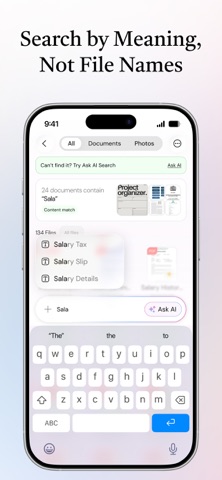
2. AI Search Across All Files
Ask a question in plain language. XeNo searches across the knowledge base - not just filenames, but the actual content inside your PDFs and Docs. It then provides contextual
answers and the name of the file that has the information.
3. AI-powered voice search
Speak about your query naturally. XeNo listens and finds the file or information based on the context that you explain from your phone’s entire library in seconds. No cloud
transcription, no recordings stored.
4. Chat With Any Document
Search for a PDF, report, or spreadsheet and ask questions directly with XeNo information retrieval. Summarize a file, extract key points, or compare it against another one.
5. Cross-File Contextual Answers
Ask “What risks did the legal brief flag that also appear in the Q3 report?” and XeNo contextual search will find the information across all the files in your knowledge base.
How It Works
1. Create personal knowledge base
Import your files into XeNo on-device AI and create an organized knowledge base. It works entirely on your phone, meaning no cloud uploads; data stays on your phone.
2. Search by typing or speaking, in plain language
Ask anything across your entire knowledge base - "summarize last week's contract" or "what risks came up in the legal brief?"
3. Get contextual answers in seconds
Chat with documents, XeNo AI file assistant searches your files, connects information across them, and responds with cited, accurate answers.
Built for People Who Handle Sensitive Information
Lawyers, researchers, consultants, analysts, and students can rely on XeNo document search because their files aren't meant for the cloud.
- Your files are never used to train our AI.
Your personal information stays private proper