SmartSelect: Safari Clipboard

SmartSelect: Safari Clipboard Summary
SmartSelect: Safari Clipboard is a free, with in-app purchases iOS app in Tools by Abdelkarime Achtaou. Released in Mar 2026 (6 months ago). Store last updated Sep 10, 2026
SmartSelect: Safari Clipboard SDKs Summary
App not yet scanned for SDKs.
0★
Ratings: 0
Screenshots

App Description
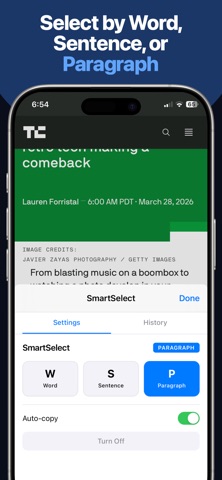
Tired of fighting Safari's text selection? SmartSelect lets you tap to select text at the word, sentence, or paragraph level — instantly copied to your clipboard.
No more dragging handles. No more missed selections. Just tap.
HOW IT WORKS
1. Enable SmartSelect in Safari Extensions settings
2. Tap the SmartSelect icon in Safari's toolbar
3. Choose your mode: Word, Sentence, or Paragraph
4. Tap any text on the page — selected and copied instantly
CLIPBOARD HISTORY
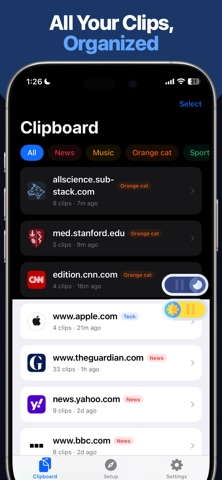
Every clip is saved and organized by website. Browse your clips by site, then by article. Tap any clip to re-copy it. Pin important clips so they stay at the top.
POWER FEATURES
- Search across all your clips
- Copy All clips from a page in one tap
- Export as Markdown with source attribution
- Smart duplicate detection
- Word and character count on every copy
WORKS EVERYWHERE
SmartSelect works on any webpage in Safari — news articles, research papers, documentation, blogs. It respects editable fields and code blocks, and supports sentence segmentation across multiple languages.
PRIVACY FIRST
No data collected. No accounts. No tracking. Everything stays on your device.
SmartSelect Pro unlocks unlimited copies, full clipboard history, search, pin, and export features for a one-time purchase.
Terms of Use (EULA): https://www.apple.com/legal/internet-services/itunes/dev/stdeula/