Pomlo - Project & Goal Tracker

Pomlo - Project & Goal Tracker Summary
Pomlo - Project & Goal Tracker is a free, with in-app purchases iOS app in Productivity by Echo Persona LLC. Released in May 2026 (2 months ago). Store last updated Jul 24, 2026
Pomlo - Project & Goal Tracker SDKs Summary
App not yet scanned for SDKs.
0★
Ratings: 0
Screenshots




App Description
If you've ever wondered where your day went, Pomlo is for you.
It's a simple time tracker that gets out of your way. Tap play, do your thing, and Pomlo keeps a clean record of how you spend your hours. No complicated setup, no account required — just open the app and go.
WORKS THE WAY YOU DO
Some people track billable hours for clients. Others want to build better habits or stay on top of personal goals. Pomlo handles both.
Switch between a Personal workspace for things like exercise, reading, and side projects — and a Work workspace for clients, invoices, and billable tracking. Each workspace has its own settings, so you're never looking at stuff you don't need.
TIMER THAT STAYS OUT OF YOUR WAY
Tap once to start. Tap again to stop. That's it. You can also add time manually if you forgot to hit the button (we've all been there). Assign a project or goal, add a tag, and move on.
Need more structure? The built-in Pomodoro timer runs 25-minute focus sessions followed by short breaks — and it automatically logs each completed session as a time entry. Customize the durations, auto-start the next phase, and link sessions to a project.
HOME SCREEN WIDGET
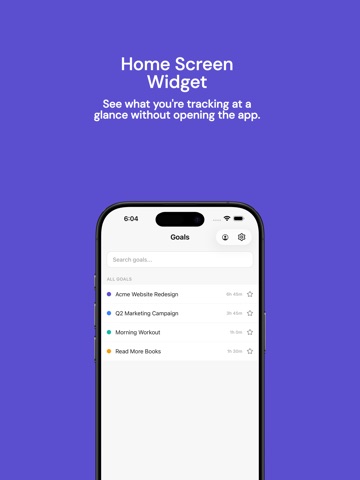
Start and control your timer without opening the app. The home screen widget shows your currently tracked project and elapsed time, with pause and stop buttons right there. Tap start to jump straight into focus.
GOALS, PROJECTS & CLIENTS
Call them goals or projects — Pomlo adapts the language based on your workspace type. Personal workspaces show "Goals" with templates like Exercise, Meditation, Reading, and Deep Work. Work workspaces show "Projects" with templates for Development, Design, Management, and more.
Each project gets its own color, optional budget, and hourly rate. Link projects to clients to see exactly how much time and money you're putting into each relationship. When it's time to bill, everything's already organized.
INVOICES IN MINUTES
Turn tracked hours into clean, professional invoices. Add your company logo, set your tax rate and payment terms, drop in line items, and send. Track each invoice through draft, sent, and paid status. All invoices live under each client, so nothing slips through.
REPORTS YOU'LL ACTUALLY READ
The reports page shows your hours broken down by day, project, and client — with bar charts for daily trends and a donut chart for project distribution.