ReFrame: Dual Camera Recorder

ReFrame: Dual Camera Recorder Summary
ReFrame: Dual Camera Recorder is a free, ad-supported, with in-app purchases iOS app in Photo And Video by DAMIEN, NATHANAEL ELLEDGE. Released in Apr 2026 (7 months ago). It has 159 ratings with a 4.74★ (excellent) average. Based on AppGoblin estimates, it reaches roughly 279 monthly active users and generates around $<10K monthly revenue (66% IAP / 34% ads). Store last updated Sep 18, 2026
SDK intelligence: AppGoblin detected 1 ad networks(e.g. Google),and 1 business tools integrated into ReFrame: Dual Camera Recorder. View full SDK list →
ReFrame: Dual Camera Recorder SDKs Summary
ReFrame: Dual Camera Recorder was last scanned for SDKs on 2026-09-29. Below is the overview of third-party companies detected in the app. The full list of SDKs, permissions and unknowns is available here.
 Google
 RevenueCat
4.74★
Ratings: 159
Screenshots


App Description
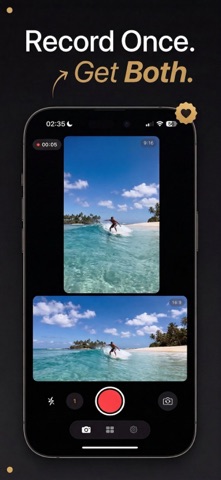
ReFrame: Dual Camera Recorder records portrait and landscape video at the same time, from a single take. Hit record once and walk away with a 16:9 horizontal video for YouTube and a 9:16 vertical video for Reels, Shorts and TikTok. No re-recording. No cropping afterwards. One take, two ready-to-post videos.
- ONE TAKE. TWO FORMATS.
Traditional cameras make you choose: landscape or portrait. You nail the perfect take, then realize you shot it in the wrong orientation. ReFrame ends that for good: every recording produces twin videos in both aspect ratios, ready to export wherever you need them.
- FULL SENSOR CAPTURE
Instead of cropping your footage after the fact, ReFrame uses your camera's full sensor, so both the landscape and the portrait output get the highest quality your iPhone can deliver. No wasted pixels, no compromised resolution.
- SEE BOTH FRAMES BEFORE YOU RECORD
• Split View: your landscape and portrait frames stacked in one clean layout
• Picture-in-Picture: a compact overlay that keeps one frame front and center
Switch layouts instantly and frame your shot exactly the way you want.
- EDIT ONCE. BOTH VIDEOS UPDATE.
The built-in studio edits your 9:16 and 16:9 together: trim, add captions, text, music and filters, merge takes — and every change lands in both videos at the same time. Nudge either one on its own when you want.
- SCRIPT & AUTO-CAPTIONS
Read from a teleprompter while you film — it never appears in your recordings. When you're done, auto-caption your clips, transcribed on your iPhone and never uploaded.
- FACE TRACKING
Move freely. Face Tracking keeps you centered in both crops, hands-free.
- PRO QUALITY
• 4K, 2K and 1080p, up to 60 fps, 10-bit HDR
• Video stabilization
• Every lens on your device, front and back
• Flash for low light
• Export quality and frame rate per video
- PHOTOS TOO
Photo mode captures a portrait and a landscape photo in one tap.
- BUILT FOR CREATORS
Vloggers, filmmakers, social media creators: stop shooting everything twice. One shoot gives you horizontal video for YouTube and widescreen, and vertical video for Instagram Reels, YouTube Shorts, TikTok and Stories — with a share bar set up for the platforms you post to. Start recording from a Home Screen or Lock Screen widget, or with the Camera Control button.
- PRIVACY FIRST
All processing happens on your device. No cloud uploads,