TV Remote: Smart WiFi Control

TV Remote: Smart WiFi Control Summary
TV Remote: Smart WiFi Control is a free, ad-supported iOS app in Tools by Ankit Seth. Released in May 2026 (5 months ago). It has 18 ratings with a 4.61★ (excellent) average. Based on AppGoblin estimates, it reaches roughly 158 monthly active users and generates around $<10K monthly revenue (0% IAP / 100% ads). Store last updated Sep 24, 2026
Recent activity: 2.00 new ratings this week View trends →
TV Remote: Smart WiFi Control SDKs Summary
App not yet scanned for SDKs.
4.61★
Ratings: 18
Screenshots



App Description
Turn your phone into a powerful universal remote for your Smart TV.
No extra hardware needed — just connect to the same WiFi network as your TV and take control instantly.
EASY SETUP
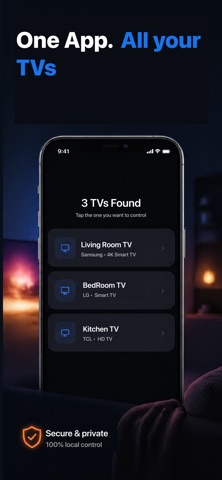
Open the app, and it automatically discovers your TV on the network. No complicated pairing codes or manual configuration — just tap and connect.
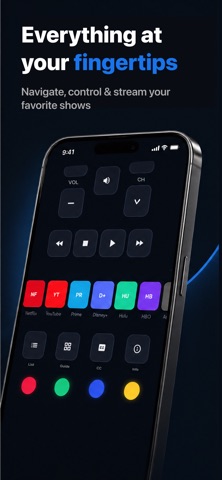
FULL REMOTE CONTROL
Everything you need, right on your phone:
- D-Pad navigation with OK/Select
- Volume up, down, and mute
- Channel up and down
- Power on and off
- Home, Back, Menu, and Exit buttons
- Media controls: Play, Pause, Stop, Rewind, Fast Forward
- Number pad for direct channel entry
- Input/Source selector (HDMI, AV, USB, and more)
- Color buttons (Red, Green, Yellow, Blue)
SMART TOUCHPAD
Navigate your TV like a laptop trackpad. Swipe to move, tap to select, and scroll through menus with natural gestures. Adjustable sensitivity so it feels just right.
QUICK APP LAUNCHER
Launch your favorite streaming apps with one tap — no more scrolling through menus.
SAVE MULTIPLE TVs
Control every TV in your home. Save your devices and switch between them instantly — bedroom, living room, office — all from one app.
CUSTOMIZABLE
- Choose haptic feedback intensity
- Adjust button size
- Toggle button sounds
- Keep screen on while using the remote
- Auto-connect to your last used TV
- Dark and AMOLED themes
REQUIREMENTS
Your phone and TV must be on the same WiFi network. Your TV must be a Smart TV with network connectivity.
Lost your remote? Broke your remote? Or just want something better? Download now and never search between couch cushions again.