Rafter Builder: Roof Framing

Rafter Builder: Roof Framing Summary
Rafter Builder: Roof Framing is a free, with in-app purchases iOS app in Tools by Jalsaa. Released in Apr 2026 (6 months ago). Store last updated Apr 21, 2026
Rafter Builder: Roof Framing SDKs Summary
App not yet scanned for SDKs.
0★
Ratings: 0
Screenshots


App Description
Rafter Builder is a professional roof framing calculator and design toolkit for contractors, framers, carpenters, and serious DIY builders. Run accurate rafter calculations, generate cut lists, visualize framing in 2D and 3D, and export PDF blueprints — all from your iPhone, iPad, or Mac.
11 ROOF BUILDERS. EVERY JOB.
Rafter Builder covers the full range of residential roof geometry:
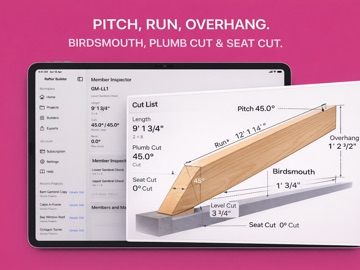
• Common Rafter — pitch, run, overhang, birdsmouth, plumb and seat cuts
• Hip Roof — hip rafter, jack rafter schedule, bevel and backing angles
• Valley — intersecting roof geometry, valley lengths, cut angles
• Gable Truss — span, pitch, webs, and fabrication layout
• Dormer — dormer framing integrated into a main roof body
• Single Slope — lean-to and shed roof workflow
• Open Valley — flashing gap, valley rafter, and cut-angle sheet
• Gambrel — dual-pitch profile with segmented rafters
• Turret — polygon-based radial rafter framing
• Bay — bay roof facets, hips, and compact framing schedule
• A-Frame — symmetrical A-frame with ridge and full-span rafters
Common Rafter is free. All other builders are included with Rafter Builder Pro.
PRECISE OUTPUT. EVERY TIME.
Enter roof pitch, run, overhang, and lumber details. Get exact member lengths, rise, tail, fascia height, birdsmouth dimensions, plumb cuts, and seat cuts — to 1/16" precision or finer. Results update in real time as you type.
CUT LISTS. MATERIAL LISTS. PDF BLUEPRINTS.
Every build produces a complete cut list by member type, a material list by lumber size and quantity, and a structured PDF blueprint ready to print or share with your crew. Exports are versioned so you always know which plan went to the field.
2D AND 3D VISUALIZATION
View your roof from the top, side, or in a live 3D orbit. Tap any member to inspect its exact dimensions, angles, and cut details. Toggle labels on or off. The 3D model renders in under two seconds for standard projects.
BUILT FOR THE JOB SITE
• Fully offline — no account, no email, no sign-in required
• Works on iPhone, iPad, and Mac Catalyst
• Imperial (feet-inch-fraction) and metric
• Large touch targets for glove-friendly use
• Autosaves continuously — interruptions never lose your work
• Organize jobs into folders and archive completed projects
PROJECT MANAGEMENT
Save and reopen projects, duplicate jobs for vari