Opla - Photo organizer

Opla - Photo organizer Summary
Opla - Photo organizer is a free, with in-app purchases iOS app in Photo And Video by Tiny Whale Pte. Ltd.. Released in May 2026 (4 months ago). It has 1.00 ratings with a 5.00★ (excellent) average. Based on AppGoblin estimates, it reaches roughly 19 monthly active users and generates around $<10K monthly revenue (100% IAP / 0% ads). Store last updated Sep 23, 2026
Opla - Photo organizer SDKs Summary
App not yet scanned for SDKs.
5★
Ratings: 1.00
Screenshots


App Description
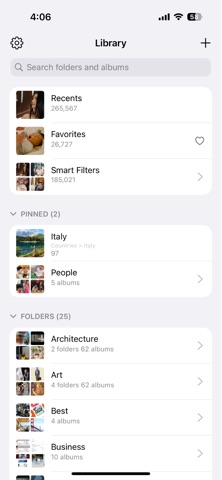
Opla is a faster, more powerful organizer for people with serious Apple Photos libraries.
It is built for heavy Photos users: people with years of photos, thousands of albums, messy folders, old screenshots, long videos, hidden items, and too many photos that are not where they should be.
Opla is designed to stay fast with very large libraries, including libraries with more than 300K photos and 1,000 albums. On-device indexes help keep browsing, album membership, Date Taken views, Places, and Smart Filters responsive without uploading your library.
Features:
- Fast browsing for large photo libraries
- Folder-first album and folder management
- Search across folders, albums, Smart Albums, and Smart Filters
- Pin important albums, folders, and Smart Filters
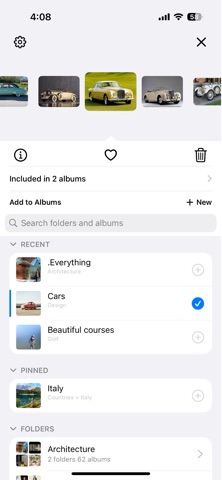
- Recently used albums for faster organizing
- Auto-open Recents on launch
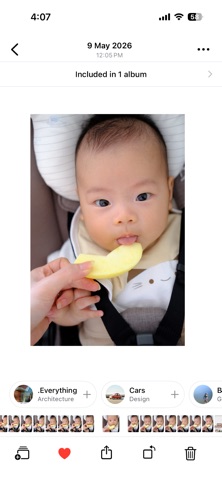
- Quick Add from the photo viewer
- Add photos and videos to albums without digging through menus
- Create albums and folders while organizing
- Move items between albums
- Remove items from albums without deleting them from your library
- Merge albums
- Duplicate albums
- Sort albums by newest, oldest, longest, shortest, or largest dimensions
- Filter albums by photos, videos, screenshots, Live Photos, RAW, Portrait, panoramas, Spatial, Slo-mo, timelapses, screen recordings, and Cinematic
- Smart Filters for finding photos that need attention
- Find items not in any album
- Find non-favorites, old screenshots, old Live Photos, long videos, long Slo-mo videos, large photos, large RAW photos, large hidden photos, and long hidden videos
- Find photos by Date Taken, including Today, Yesterday, Last 7 days, Last 30 days, On this day, years, and month-by-month views
- Find items included in exactly 1, 2, 3, or 4+ albums
- Places filters for location-based cleanup
- Recently Deleted guidance when Apple requires using the Photos app
- Delete non-favorites only, so favorites are protected during cleanup
- Favorite, unfavorite, hide, unhide, delete, and share from selection mode
- Batch crop selected photos with matching dimensions
- Batch rotate selected photos with preview before saving
- Full-screen photo and video viewer
- Filmstrip navigation
- Rotate, zoom, pan, and gesture-based photo viewing
- Photo info, including album membership and location details
- Optional Hidden album access with Face ID
- Hide empty media type albums
- Vi