ArcReader: Web Novel Offline

ArcReader: Web Novel Offline Summary
ArcReader: Web Novel Offline is a free, ad-supported, with in-app purchases iOS app in Books And Reference by Thien Le. Released in Apr 2026 (5 months ago). It has 35 ratings with a 4.92★ (excellent) average. Based on AppGoblin estimates, it reaches roughly 379 monthly active users and generates around $<10K monthly revenue (61% IAP / 39% ads). Store last updated Sep 11, 2026
Recent activity: 3.00 new ratings this week View trends →
ArcReader: Web Novel Offline SDKs Summary
App not yet scanned for SDKs.
4.92★
Ratings: 35
Screenshots
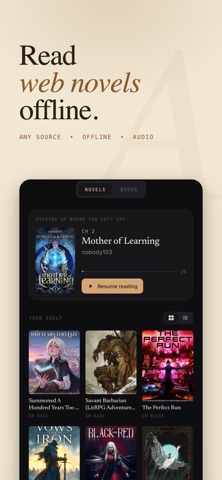


App Description
Paste any web novel link. Download every chapter. Read offline anywhere — no account, no subscription required to start.
ArcReader is the offline-first reader for Royal Road, WTR-Lab, NovelFire, and dozens more sources. Bring your own link, we handle the rest — whether it's progression fantasy, xianxia, cultivation fiction, LitRPG, isekai, romance, or any English web novel and light novel.
Loved by readers who wanted something quieter: no crowded feeds, no coin walls, just your books.
Built for readers who want full control: pick your theme, your font, your scroll mode, and read offline whenever you want.
POPULAR GENRES ON ARCREADER
Progression Fantasy · Cultivation · Xianxia · Wuxia · Xuanhuan · LitRPG · GameLit · Isekai · Reincarnation · Fantasy · Romance · Sci-Fi · Fanfiction · Thriller · Horror · Slice of Life · Harem · Adventure
WHY READERS LOVE ARCREADER
A reader designed for long sessions
Choose between four themes (Light, Dark, Sepia, Black AMOLED). Adjust font size, line spacing, font family, and margins to find your perfect setup. Switch between paginated mode with page-turn animation, or smooth continuous scroll.
Listen with on-device narration
Built-in neural text-to-speech turns any novel into an audiobook — runs entirely on your device. No internet required, no data costs, no monthly fees for the core feature. Adjustable speed from 0.75x to 2x, lock-screen controls, sleep timer, and auto-advance between chapters.
Offline-first reading
Downloaded content stays on your device in a local library — not a temporary cache. Read on airplanes, in tunnels, or anywhere connectivity is unreliable.
Import your own EPUB files
Already have books saved as EPUB? Import them straight into your library and read them with the same themes, fonts, and narration as everything else.
Look up words and build vocabulary
Tap any word for an instant dictionary definition, then save it as a flashcard. Review your flashcards later to lock in new vocabulary as you read.
Highlights and notes
Long-press to highlight passages in four colors with optional notes. Review all your highlights for any title in one place.
Reading position sync
Auto-saves your position every few seconds. Open a book on another device and continue exactly where you left off, after signing in.
No sign-up wall
Open the app and start reading. Account creation is optiona