FitCurve: Weight Loss Tracker

FitCurve: Weight Loss Tracker Summary
FitCurve: Weight Loss Tracker is a free, with in-app purchases iOS app in Health And Fitness by 凌峰 高. Released in May 2026 (4 months ago). Store last updated Sep 17, 2026
FitCurve: Weight Loss Tracker SDKs Summary
App not yet scanned for SDKs.
0★
Ratings: 0
Screenshots


App Description
FitCurve tracks weight, body composition, and long-term change. Charts, trends, photos, and lifestyle context help you understand your own journey—not just today’s number.
■ Log More Than Weight
Record weight, body fat, and BMI in seconds. Track chest, waist, hips, thighs, calves, and upper arms, with optional left/right limb entries. Add a five-level mood, journal, photo captions, and record source. All body-data logging is free.
■ Charts & Body Profile: See Meaningful Change
The Super Chart plots every entry with body-fat and BMI mini charts. Pro filters daily noise and unlocks longer ranges, landscape view, and zoom. Body Profile adds measurement trends, a composition radar, BMR/TDEE, and optional blood pressure from Apple Health.
■ Calendar & Body Epoch: From Today to the Whole Journey
The calendar color-codes daily changes and provides recent monthly and weekly summaries. Body Epoch maps your start, peak, low, current value, and goal on a timeline. Pro adds longer history, custom observation cycles, monthly/yearly reports, and gentle projections.
■ Body Status: Put Weight in Context
With HealthKit permission, FitCurve reads sleep, steps, active energy, and workouts from iPhone and Apple Watch. Weekly comparisons show your rhythm. Pro dual-axis charts, scatter plots, and insights show concurrent relationships with weight change. Reorder or hide modules anytime.
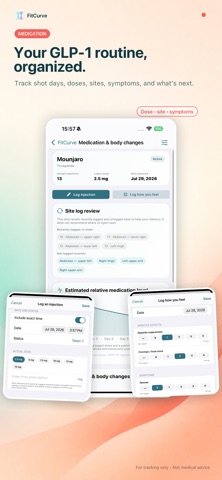
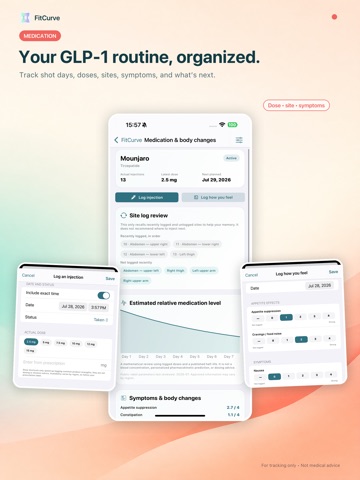
■ Optional GLP-1 Medication Log
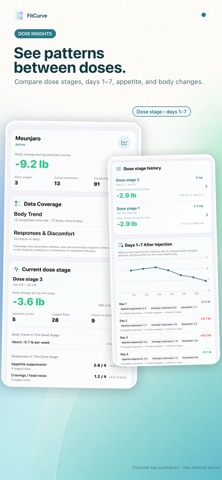
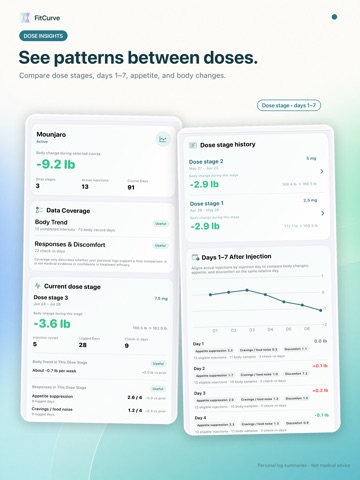
Log courses, actual injections, doses, presentations, sites, and daily check-ins. Backfill history, use on-device reminders, and keep an archive. Catalogs adapt to China, the US, or international markets. Pro compares dose stages, Days 1–7, and trends before, during, and after treatment. For personal logging only; no medical advice, causation, or effectiveness assessment.
■ Progress Photos & Time Machine
Separate front, side, back, and full-body guides keep photos consistent. Time Machine reviews them chronologically. Pro creates timelapse videos with date and weight, slider comparisons, and a photo wall.
■ Goals, Sharing & Professional Reports
Set a target and date, view basic progress, and keep ended-goal history. Pro adds dual time/weight progress, pacing, and projections. Eight share cards cover stats, reports, achievements, consistency, and goal journeys; two are free. Pro adds templates, palettes, privacy options, and social c