Find Phone: Clap, Whistle

Find Phone: Clap, Whistle Summary
Find Phone: Clap, Whistle is a free, ad-supported, with in-app purchases iOS app in Tools by 旖琳 张. Released in Jun 2026 (3 months ago). Store last updated Aug 15, 2026
Find Phone: Clap, Whistle SDKs Summary
App not yet scanned for SDKs.
0★
Ratings: 0
Screenshots

App Description
Never lose your phone again. With Find My Phone: Clap & Whistle, just clap your hands or whistle, and your device will respond instantly—making it easy to locate your phone, even if it’s on silent or tucked away.
Key Features
Clap Phone Finder
Find your phone instantly by clapping. No need to remember where you left it—just clap, and your phone will respond.
Whistle App Finder
Prefer whistling? Your phone can react to whistles too, giving you another quick way to locate it.
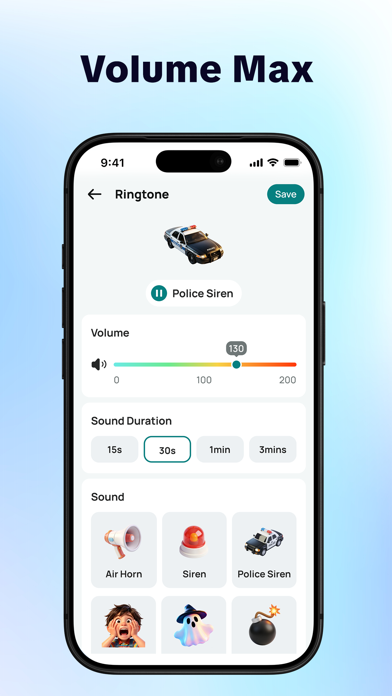
Volume Boost
Your phone will ring at 200% maximum volume, even if it’s set to silent or low volume—so you can hear it loud and clear from anywhere, thanks to the clap finder app.
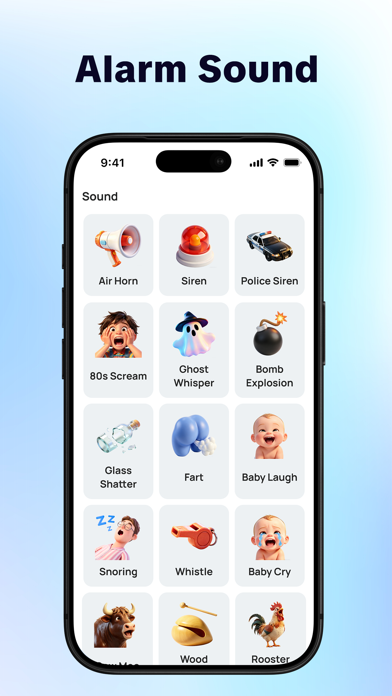
Alarm Sound
Choose from airhorn, siren, doorbell, and more, all designed to help you find your phone fast.
High Precision Detection
Advanced detection ensures your phone accurately responds to your clap or whistle, minimizing false triggers.
Vibration & Flash
Find your device even if you can’t hear it. Vibration adds an extra layer of detection, and your phone will also flash brightly to help you spot it in the dark or under objects.
Why Choose Clap Phone Finder?
• Clap finder, whistle finder
• Works even in silent mode
• Quick and easy setup
• Battery-efficient design
• Reliable detection technology
Subscription Instructions:
1. Subscription options: Weekly membership.
2. Subscription cost: Based on in-app package pricing.
3. Payment: Your iTunes account will be charged once the purchase is confirmed.
4. Your iTunes account will be charged 24 hours before the subscription expires, and the subscription will automatically renew for the next cycle after successful payment.
5. To cancel your subscription, make sure to turn off auto-renewal at least 24 hours before the current subscription period ends.
6. On your Apple device, go to [Settings] -> Tap [iTunes Store and App Store] -> Tap [Apple ID] -> [View Apple ID] -> [Subscription], then choose to cancel the subscription. If you cancel at least 24 hours before the end of the subscription period, the subscription won’t renew automatically.
Privacy Policy: https://www.tvmaster.mobi/TVMaster.html
Terms of Use: https://www.tvmaster.mobi/tos.html