Zybra Cast

Zybra Cast Summary
Zybra Cast is a free, with in-app purchases iOS app in Tools by Vu Thi Hanh. Released in May 2026 (5 months ago). Store last updated May 7, 2026
Zybra Cast SDKs Summary
App not yet scanned for SDKs.
0★
Ratings: 0
Screenshots



App Description
Zybra Cast turns your iPhone into a wireless display remote for any smart TV in your home. Cast videos, photos, and your full iPhone screen to TVs and streaming devices that speak the open protocols Apple supports out of the box. No extra hardware, no cables, no account.
WHY CHOOSE ZYBRA CAST
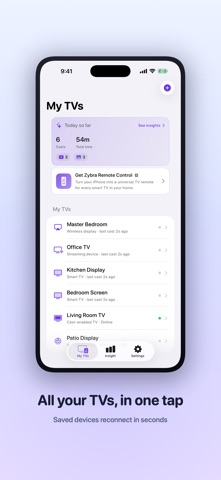
Saved TVs with instant reconnect. Most cast apps make you re-discover the network every time you open them. Zybra Cast remembers every TV you have used, lets you nickname them (Living Room, Bedroom, Kitchen), and reconnects in three taps.
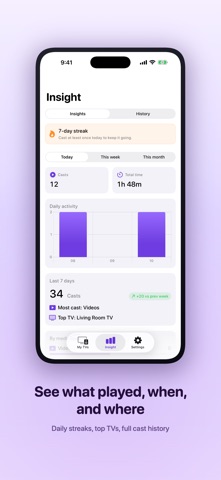
Full cast history. Browse a chronological log of everything you have ever cast, grouped by day. See what played, when, and on which TV. Re-find a video you watched last night without scrolling through your library.
Cast photos and videos from your library. Pick from Photos, tap Cast, and your TV starts playing in seconds. Local files stream over Wi-Fi at original quality with byte-range seeking, so scrubbing through long videos works the way you expect.
Mirror your entire iPhone screen. Show off games, share work presentations, or watch web videos on the big screen. HLS-based mirror keeps the stream smooth and the latency low.
Friendly device names. Zybra Cast reads each TV's actual user-set name and displays that (Living Room TV, Mom's Display) instead of cryptic technical strings.
Step-by-step connection guides. Different smart TVs ask for different first-time approval flows — a popup on the TV, a pairing prompt, a quick toggle in the TV's settings. Zybra Cast walks you through each path right inside the app.
HONEST ABOUT WHAT IS POSSIBLE
Streaming services that use FairPlay DRM (Netflix, Disney Plus, HBO Max, Apple TV Plus) cannot be cast or mirrored from any third-party app. This is an Apple platform restriction, not something cast apps can work around. Use the cast button inside those apps, or stream natively through Control Center.
PRIVACY FIRST
Everything stays on your local Wi-Fi network. Zybra Cast does not upload your media, does not track your usage, and does not require an account. Your iPhone serves files directly to your TV over your home network. No cloud, no servers, no analytics.
REQUIREMENTS
iPhone running iOS 17 or later, on the same Wi-Fi network as your TV.
SUPPORT
Tap Help inside the app for connection guides and answers to common questions. For everything else, reach us through the support link b