
ZECURI Summary
ZECURI is a free, with in-app purchases iOS app in Productivity by LineSpotting AB. Released in Jun 2026 (3 months ago). Store last updated Sep 6, 2026
ZECURI SDKs Summary
App not yet scanned for SDKs.
0★
Ratings: 0
Screenshots


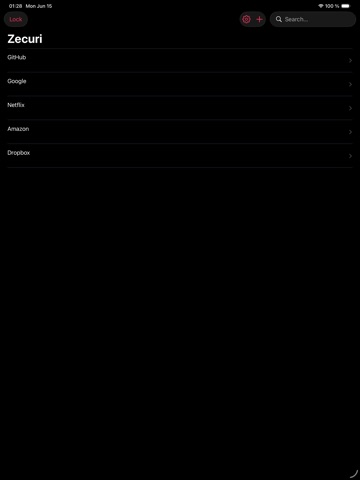
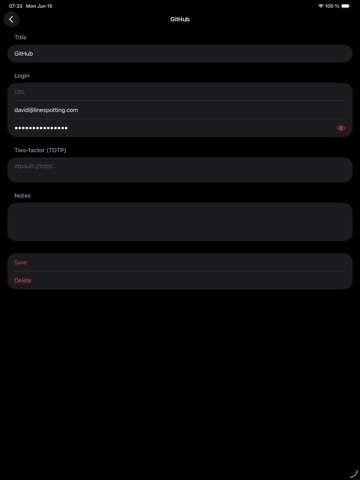

App Description
Zecuri is a privacy-focused password manager for iPhone and iPad. Your vault is encrypted on your device. Only you hold the master password.
FREE — LOCAL VAULT
• Unlimited logins in your on-device vault (title, URL, username, password, notes)
• On-device encryption — AES-256-GCM (CryptoKit) and Argon2id key derivation
• Search by title, URL, or username
• TOTP codes from an otpauth:// URI
• Optional Face ID / Touch ID unlock
• Optional hardware security key or recovery code in addition to the master password
• Encrypted backup export/import
• CSV import from Bitwarden, 1Password, LastPass, Chrome, or KeePassXC
• Password AutoFill extension (Settings → Passwords → AutoFill Passwords)
• Works offline — no account required for the local vault
ZECURI PREMIUM
• Encrypted sync across your devices
• Subscribe or Restore Purchases in Settings → Zecuri Premium
• The App Store shows the localized price in the paywall
• Vault contents stay end-to-end encrypted; Zecuri cannot read your passwords
HOW IT WORKS
1. Create a master password (12+ characters). It stays on your device.
2. Zecuri derives an encryption key with Argon2id and encrypts your vault with AES-256-GCM.
3. Use the local vault for free. Premium unlocks encrypted sync.
4. Lock the vault when you are done.
SECURITY & PRIVACY
• AES-256-GCM vault encryption
• Argon2id key derivation (64 MiB, t=3, p=4)
• Master password and derived keys are not sent to Zecuri
• No analytics, no telemetry, no ads
• Built by LineSpotting AB (Sweden)
Requirements: iOS 16+. Internet is not required for the local vault.
Privacy Policy: https://zecuri.com/privacy/
Terms: https://zecuri.com/tos/
Support: https://zecuri.com/support
Contact: privacy@zecuri.com