Bank Statement Converter

Bank Statement Converter Summary
Bank Statement Converter is a free, with in-app purchases iOS app in Business by B TO J PTY LTD. Released in Oct 2026 (recently released ago). Store last updated Oct 13, 2026
Bank Statement Converter SDKs Summary
App not yet scanned for SDKs.
0★
Ratings:
Screenshots


App Description
Turn PDF bank statements into QuickBooks, Xero and MYOB-ready CSV files with AI.
No manual data entry. No copying transactions one by one. Simply import your bank statement and let AI do the work.
Bank Statement CSV AI automatically reads your PDF bank statements, extracts transactions, organises the data and prepares clean files ready for your accounting workflow.
HOW IT WORKS
1. Import your PDF bank statement
2. AI automatically extracts your transactions
3. Review your data
4. Export your file
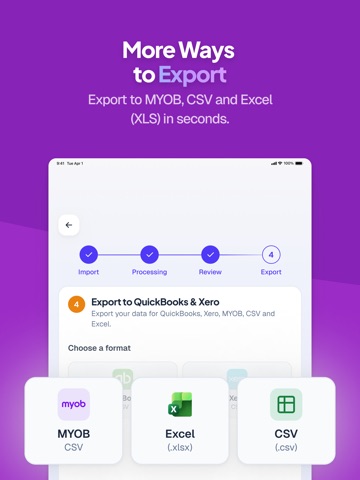
EXPORT FOR YOUR ACCOUNTING SOFTWARE
• QuickBooks CSV
• Xero CSV
• MYOB CSV
• Standard CSV
• Excel (XLS)
AI-POWERED PDF IMPORT
Forget manually entering dates, descriptions and amounts. AI reads your bank statement and converts the transactions into structured financial data in seconds.
BUILT FOR QUICKBOOKS & XERO WORKFLOWS
Need to move bank statement transactions into your accounting software? Generate properly structured CSV files that make importing your financial data easier.
ZERO DATA ENTRY
Your bank statement already contains the information you need. Instead of entering it all again, simply upload the PDF and let AI extract the data for you.
REVIEW BEFORE YOU EXPORT
Preview your transactions before creating your final file. Check dates, descriptions, income and expenses, and make adjustments when needed.
FROM PDF TO SPREADSHEET
Need a regular spreadsheet instead? Export your bank statement transactions as CSV or XLS for further editing, reporting or sharing with your accountant.
IDEAL FOR
• Small business owners
• Sole traders and self-employed professionals
• Bookkeepers
• Accountants
• Freelancers
• Anyone preparing financial records for QuickBooks, Xero or MYOB
Stop manually copying transactions from bank statements.
Import your PDF. Let AI read it. Export your accounting-ready CSV.
[ Upgrade to subscription version ]
Subscription version offers cloud sync and back up feature so that you can save all the info in our highly secured cloud services and share the same data in multiple iOS devices such as iPhone and iPad.
Upgrading to subscription version requires auto-renewal subscription. Payment will be charged to your Apple ID account at the confirmation of purchase.
The subscription automatically renews unless it is canceled at least 24 hours before the end of the current period. Your account will be charged for re