Snapledgr: Schedule C Taxes

Snapledgr: Schedule C Taxes Summary
Snapledgr: Schedule C Taxes is a free, with in-app purchases iOS app in Finance by Dennis Harrington. Released in May 2026 (4 months ago). Store last updated May 13, 2026
Snapledgr: Schedule C Taxes SDKs Summary
App not yet scanned for SDKs.
0★
Ratings: 0
Screenshots



App Description
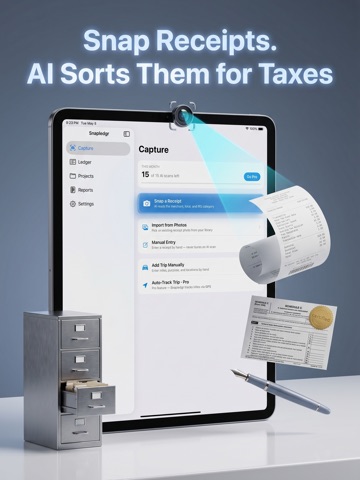
Snapledgr is the receipt scanner and mileage tracker built for self-employed work — 1099 contractors, freelancers, gig workers, small business owners filing Schedule C. Snap a receipt, the app reads the merchant, total, date, and the right IRS tax category. Confirm with one tap. At tax time, export a clean CSV or PDF report and you're done.
No accounting jargon. No bank linking. No overcomplicated dashboards built for corporate finance teams. Just the tools a 1099 filer actually uses.
WHAT SNAPLEDGR DOES
• Receipt capture with AI — Snap a receipt, get the merchant, total, tax, tip, and date pre-filled. Suggested IRS Schedule C category, ready to confirm.
• Schedule C from day one — Every receipt maps to a real IRS tax line (Office Expense, Travel, Meals, Supplies, all 22 categories). Your ledger is already organized the way the tax form is organized.
• Mileage log — Add trips manually with the current IRS mileage rate auto-applied, or use Pro's GPS auto-track to record miles as you drive.
• Projects and clients — Tag receipts and trips to a project. See exactly what each client cost you to serve. (Pro)
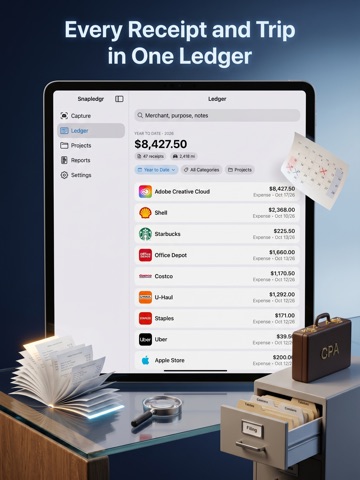
• Ledger view — Every receipt and trip in one searchable list. Filter by date range, category, or project. Running totals at the top.
• Receipt vault — Long-term searchable storage of every scanned receipt. IRS recommends keeping records for 7 years. Snapledgr keeps them for you.
• CSV and PDF export — One tap to export. Send the CSV to your accountant for their software. Print the PDF and hand it over as a clean folder. (Pro)
• Annual AI summary — A plain-English summary of your year for the front of the PDF report. Top categories, top merchants, total deductible. (Pro)
• How to Use — A built-in guide that explains every Schedule C category in plain language. No accounting degree needed.
FREE TIER
• 15 AI receipt scans every month — plenty for testing whether Snapledgr fits your workflow before you commit
• Unlimited manual entries (always free, never burns a scan)
• Unlimited mileage entries
• Full ledger, search, and receipt vault — no caps, no expiring data
• Built-in How to Use guide
PRO ($4.99/month or $29.99/year)
• Unlimited AI receipt scans
• GPS auto-track for mileage trips
• Project and client tagging
• CSV export to Numbers, Excel, or your accountant's software
• PDF tax-prep report —