Doit Todo&Time

Doit Todo&Time Summary
Doit Todo&Time is a free, with in-app purchases iOS app in Productivity by 国民 谢. Released in Jul 2026 (4 months ago). It has 1.00 ratings with a 5.00★ (excellent) average. Based on AppGoblin estimates, it reaches roughly 9.00 monthly active users and generates around $<10K monthly revenue (100% IAP / 0% ads). Store last updated Nov 1, 2026
Doit Todo&Time SDKs Summary
App not yet scanned for SDKs.
5★
Ratings: 1.00
Screenshots



App Description
doit is a comprehensive productivity app that brings together task management, goal planning, and focused work in one place.
MULTI-VIEW TASK MANAGEMENT
Switch between Today, Tomorrow, This Week, This Year, Timeline, and Staging views to see your tasks from every angle. Tasks are automatically grouped by status — overdue items are highlighted and completed items can be collapsed for a clean workspace.
REMINDERS & RECURRING TASKS
Set reminders for any task and create custom repeat schedules. Recurring series auto-generate instances with support for exceptions and scope-based deletion.
DYNAMIC ISLAND & LIVE ACTIVITIES
Track pickups, food orders, and tickets from the Lock Screen and Dynamic Island. See pickup codes, locations, and times without repeatedly opening the app.
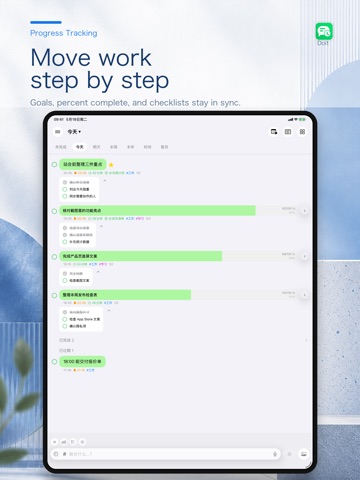
CHECKLISTS WITH PROGRESS
Break complex tasks into subtasks with individual checkboxes and real-time progress indicators. Expand or collapse checklists to stay organized.
TAG SYSTEM
Organize tasks with tags, filter by tag, and view tag-specific statistics to understand how your work is distributed.
QUANTITATIVE TRACKING
Track goals by number or by duration with live-updating progress bars. Quick increment/decrement buttons and manual input keep data entry effortless.
GOAL PLANNING
Create weekly, monthly, and yearly plans. Link plans to tasks with forward and reverse associations — from big-picture goals down to daily execution.
FOCUS MODE
Enter distraction-free focus sessions and track your concentrated work time. Review focus history to understand your productivity patterns.
VOICE INPUT
Dictate a task and see speech converted to text as you speak. Edit or add to the result with the keyboard, then tap or slide to cancel or finish.
IMAGE ATTACHMENTS
Attach photos to tasks with preview and fullscreen viewing support.
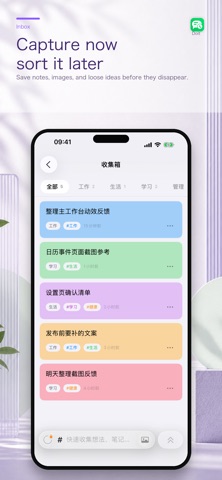
INBOX / QUICK CAPTURE
Capture ideas, notes, and images and organize them with tags. Edit notes using common Markdown formats and web links, switch to full-screen editing, and reference notes or tasks to navigate related content and backlinks.
STATISTICS
Dual-dimension analytics: task completion counts and focus duration trends help you see your productivity trajectory.
CLOUD SYNC
Sign in to sync data across supported devices and continue working on iPhone or iPad.
WIDGETS
Home Screen widgets show today's tasks and schedules, and let you start focus sessions from tags