US Visa & DV Lottery Photo

US Visa & DV Lottery Photo Summary
US Visa & DV Lottery Photo is a free, with in-app purchases iOS app in Photo And Video by Tsuyoshi Niisato. Released in May 2026 (5 months ago). It has 1.00 ratings with a 5.00★ (excellent) average. Based on AppGoblin estimates, it reaches roughly 2.00 monthly active users and generates around $<10K monthly revenue (100% IAP / 0% ads). Store last updated Aug 26, 2026
US Visa & DV Lottery Photo SDKs Summary
App not yet scanned for SDKs.
5★
Ratings: 1.00
Screenshots

App Description
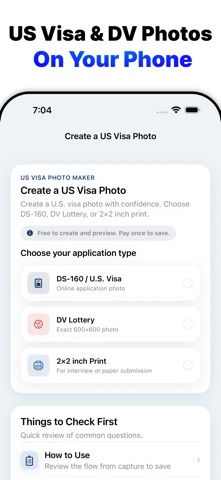
Create U.S. visa photos for DS-160 and Diversity Visa Lottery applications right on your iPhone.
US Visa Photo & DV helps you prepare a 2×2-inch / 51×51mm U.S. visa photo for online applications and print use.
You can take a new photo or choose one from your library, adjust face position and size with a guide, preview the result, and save the files when you need them.
The app is designed to help prepare photos with common U.S. visa photo requirements in mind, including DS-160 and DV Lottery photo preparation.
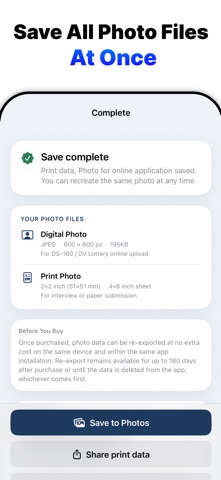
It helps create a digital JPEG photo for online applications and a 2×2-inch / 51×51mm print layout for backup prints.
This app is useful for:
• Preparing a photo for a DS-160 visa application
• Creating a photo for a Diversity Visa Lottery entry
• Making a 600 × 600-pixel U.S. visa photo
• Creating a 2×2-inch / 51×51mm photo for printing
• Adjusting face position, size, brightness, and background
• Preparing your photo at home without uploading it to a server
What you can create
Digital Application Photo
Create a JPEG photo for DS-160 or DV Lottery application use.
• 600 × 600 pixels
• File size up to 240KB
• White or off-white background
• Guided face position and size adjustment
• Preview before saving
2×2-Inch Print Layout
Create a 2×2-inch / 51×51mm photo layout for printing.
You can place your visa photo on a 4×6-inch print sheet for printing at home, a photo kiosk, or a nearby print service.
Main Features
• U.S. visa photo guide
• DS-160 photo preparation
• DV Lottery photo preparation
• 600 × 600-pixel JPEG export
• File size adjustment up to 240KB
• 2×2-inch / 51×51mm print layout
• Face position and size guide
• Brightness adjustment
• Background adjustment
• Preview before saving
• On-device photo processing
• No photo upload to external servers
How to Use
1. Take a photo or choose one from your photo library
2. Use the guide to adjust face position and size
3. Adjust brightness and background
4. Preview the digital and print versions
5. Save the files with a one-time purchase only when you need them
Privacy
All photo processing happens on your device.
Your photos and face data are not uploaded to any external server.
The app does not use AI to change your face shape or facial features.
It is designed to help create a natural photo for application use.
Important
This