Presidential Fitness Tests

Presidential Fitness Tests Summary
Presidential Fitness Tests is a free, with in-app purchases iOS app in Education by ConnectedPE Pty ltd. Released in May 2026 (5 months ago). Store last updated Sep 29, 2026
Presidential Fitness Tests SDKs Summary
App not yet scanned for SDKs.
0★
Ratings: 0
Screenshots


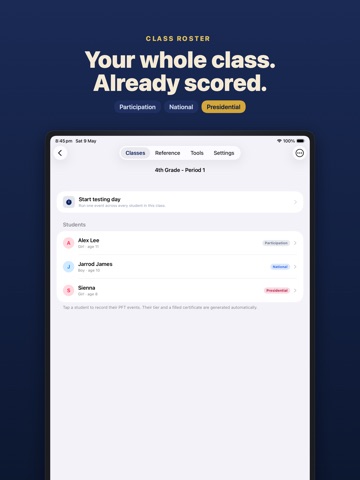

App Description
"Sienna earned the Presidential."
That's the moment the Presidential Fitness Test is for. PFT is the tool that makes it happen — without the clipboard, the calculator, or the post-class paperwork night.
Paste a roster, run all six events of the 2026 PFT in a single class period, and end the day with the official White House award certificates already printed. The app uses the 2026 standards (sourced directly from whitehouse.gov) and does the lookup, scoring, tier calculation, and certificate generation for you.
WHAT THE APP AUTOMATES
• Roster setup — paste a list of names from a spreadsheet. The app parses it. You're testing in under a minute.
• Tier scoring — enter the result, see the tier. The app applies the choose-one-per-category rule from the 2026 program and shows Presidential, National, or Participation as soon as the data is in. No award rubric to consult.
• Standards lookup — every cut score for every age and sex, two taps away. The Reference calculator replaces flipping through the whitehouse.gov PDF mid-class.
• Testing Day mode — built for a 45-minute period. Enter the whole class for one event, move to the next station, repeat. One screen, big tap targets, no menu-hopping.
• Certificate printing — tap one button at the end of testing. The app generates a single multi-page PDF with the right certificate (Presidential / National / Participation) for every qualifying student, name and date already filled in. Print, share, or AirDrop. The hour you used to spend filling certificates by hand goes away.
• Event timing and counting — the Tools tab has a stopwatch with a 60-second curl-up preset, a big-tap rep counter with haptic feedback, and a 20 BPM cadence metronome for the official push-up protocol. The screen stays awake while you use them. No second app, no third device.
• Event instructions — for each of the 6 events, the Reference tab carries the official equipment list, the step-by-step administration protocol, and the common mistakes to watch for. The PDF reference sheet you used to print and lose is now in the same app you're already holding.
WHAT TESTING DAY ACTUALLY LOOKS LIKE
You arrive with a class list in your phone, not a clipboard. You read the first event protocol from the Reference tab. You start the stopwatch from the Tools tab. As students finish, you tap their result in. You move to the n