ScreenTimeBlocker

ScreenTimeBlocker Summary
ScreenTimeBlocker is a free, with in-app purchases iOS app in Productivity by forYou inc.. Released in May 2026 (4 months ago). Store last updated Sep 10, 2026
ScreenTimeBlocker SDKs Summary
App not yet scanned for SDKs.
0★
Ratings: 0
Screenshots

App Description
Take your time back.
ScreenTimeBlocker is a focus tool for stopping the apps you can't help opening — TikTok, YouTube, Instagram, X, and more. Built on Apple's Screen Time / Family Controls, it shields only the apps you choose, the moment you hit your daily limit or step into a quiet hour.
---
■ What it does
▶ Per-app daily limits
Set fine-grained time caps per app — TikTok 30 min, YouTube 60 min, X 30 min — independently from each other.
▶ Category-wide limits
Limit entire categories like "Social" or "Games" in one tap. Newly installed apps in that category are covered automatically.
▶ Block websites too
Apply the same time limits to specific web domains opened in Safari and other browsers.
▶ Automatic shield at the limit
When the cap is reached, the target app becomes unopenable and a dedicated shield screen appears. It comes back tomorrow.
▶ Schedule-based auto-block
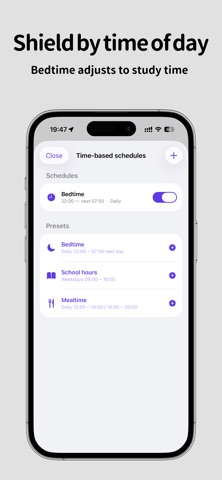
Force a block during specific hours — Bedtime (22:00 – 07:00 next day), School Hours (weekdays 08:00 – 15:00), Mealtime, and more. One-tap presets are included, and overnight ranges that cross midnight are supported.
▶ Parental passcode
Set a 4-digit PIN so kids can't quietly disable the limits. Three wrong attempts trigger a full shield across all monitored apps, closing off the workarounds.
▶ Edit lock
While monitoring is active, settings become read-only — you can't impulsively raise a limit or remove a restriction. Scrolling and viewing the list stay free.
---
■ Privacy
- Fully on-device. All settings are stored only on your iPhone.
- No personal data or usage statistics are sent to our servers.
- No analytics, no advertising SDKs, no tracking identifiers.
- Apple's Family Controls passes apps and categories as opaque tokens, so even the developer cannot see which apps you chose.
- The parental PIN is stored encrypted in the iOS Keychain.
---
■ Pricing
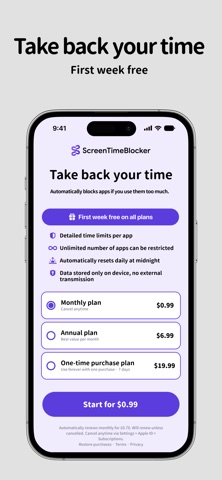
The first week is free. Keep it if you like it.
- Monthly plan
- Yearly plan
- Lifetime plan (one-time purchase)
The monthly and yearly plans include a 7-day free trial (first time only). If you do not cancel during the trial, the plan converts to a paid subscription at the end of the trial period.
Subscriptions automatically renew for the same period and price unless auto-renewal is turned off at least 24 hours before the end of the current period.
The renewal charge is billed to the Apple I