MistakeLab: Wrong Answer Log

MistakeLab: Wrong Answer Log Summary
MistakeLab: Wrong Answer Log is a free iOS app in Education by TRIMECH Dhaker. Released in Jun 2026 (4 months ago). Store last updated Jun 12, 2026
MistakeLab: Wrong Answer Log SDKs Summary
App not yet scanned for SDKs.
0★
Ratings: 0
Screenshots


App Description
Stop making the same mistake twice. MistakeLab is the ultimate wrong answer journal (error log) and spaced repetition assistant engineered for elite students preparing for high-stakes competitive exams.
Whether you are studying for the SAT, ACT, GMAT, GRE, LSAT, MCAT, CFA, or college finals, keeping a structured "error log" is the single most effective strategy recommended by top-scoring students (99th percentile) worldwide. MistakeLab automates this process, transforming your failures into exam-day breakthroughs.
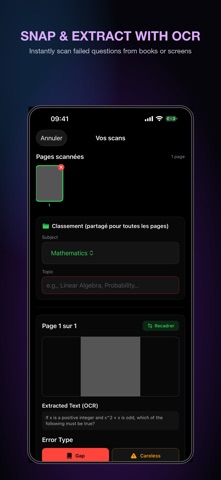
▸ SNAP & EXTRACTION WITH ON-DEVICE OCR
Stop wasting precious study time typing out long prompts. Instantly take a photo of any failed question from a prep book, worksheet, or computer screen. Apple's native OCR (Live Text) extracts the question text locally in seconds, creating a clean record automatically.
▸ DIAGNOSE THE ROOT CAUSE (COGNITIVE TAXONOMY)
To fix a mistake, you must understand why you made it. Classify your errors under 5 distinct cognitive categories:
• Content Gap: You did not know the underlying formulas or rules.
• Careless Mistake: You knew the concept but made a silly calculation slip.
• Misread: You missed a crucial word (e.g. "except", "not") or misread the question stem.
• Concept Trap: You fell for a logical trap or distractor option.
• Time Pressure: You ran out of time or panicked under the clock.
Add your custom notes and actionable remediation rules (lessons learned) to ensure you don't repeat them.
▸ SCIENTIFIC SPACED REPETITION (SM-2 SRS)
Reviewing a correction immediately after seeing it creates a false sense of fluency. Powered by a local adaptation of the SuperMemo-2 (SM-2) algorithm, MistakeLab schedules review sessions at mathematically optimal intervals (Day 1, Day 3, Day 7, etc.) based on your performance.
• Daily Review Queue: Easily work through questions scheduled for revision today.
• Fluid gestures: Swipe right to master, swipe left to keep in queue.
• Rich haptic feedback via CoreHaptics for an engaging, physical review loop.
▸ ANALYZE YOUR WEAKNESS PATTERNS
Stop guessing what to study. The analytics engine uses native Swift Charts to visualize:
• Cognitive Failure Breakdown: Check if you suffer more from careless slips or core concept gaps.
• Topic Weakness Matrix: Find which exam sections (e.g. Quantitative, Reading Comp) have the highest error density.
• Learning Curve