Clink: Custom Keyboards

Clink: Custom Keyboards Summary
Clink: Custom Keyboards is a mobile iOS app in Tools by William Whitehouse. Released in Jun 2026 (2 months ago). It has 8.00 ratings with a 3.62★ (average) average. Based on AppGoblin estimates, it reaches roughly 80 monthly active users . Store last updated Jul 13, 2026
Clink: Custom Keyboards SDKs Summary
App not yet scanned for SDKs.
3.62★
Ratings: 8.00
Screenshots




App Description
A keyboard that's finally yours.
Clink replaces the system keyboard with one you actually control: the look, the feel, the sound, the layout, and the extras. One-time purchase. No subscription. Everything runs on your device.
LIQUID GLASS
The only third-party keyboard with a true Liquid Glass look. Keys are translucent and alive. Predictions appear as you type, and each key ripples under your finger as you swipe. Four variants: Dark, Light, Mint, and Ember.
THEMES
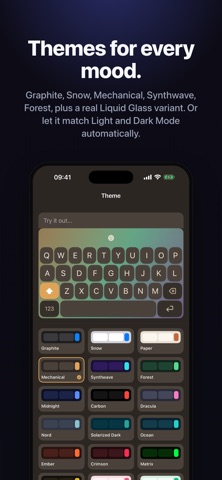
Eleven built-in themes (Liquid Dark, Liquid Light, Graphite, Snow, Paper, Mechanical, Synthwave, Forest, Cinder, Coral, and Latte) plus a full theme editor to build your own. Set it to follow Light and Dark Mode automatically, or pin it to one look.
LAYOUTS
QWERTY, AZERTY, QWERTZ, and Dvorak. Add a number row for one-tap digits. Turn on key popups, or the Liquid Glass popup variant, so every press lands exactly where you mean.
SPLIT KEYBOARD
Open a gap down the middle so the keys pull toward the screen edges and your thumbs reach less. Tune the gap width, set where each row splits, and let the boundary letter and space bar drift toward whichever thumb is free.
SWIPE TYPING
Trace a path and the word appears on lift. On Liquid Glass, each key swells under your finger as you pass, a morph effect no other keyboard has. Swipe now reads contractions like don't and you're, keeps the runner-up words one tap away when it guesses wrong, and learns the words you use. Dress the trail in seven looks: Solid, Neon, Rainbow, Sparkle, Comet, Fire, and Ocean, or keep it clean.
OFFLINE AUTOCORRECT
Autocomplete and autocorrect run entirely on your device. No account. No data leaves your phone. Works on a plane, in a tunnel, everywhere. It now learns the fixes you make over and over, catches real-word slips like tat into that, splits run-on words like alot into a lot, and ranks suggestions by what fits the word before them.
SOUNDS & HAPTICS
System click or a custom sound pack. Dial in the volume and pair it with haptics as light or as firm as you like. Full Access is only needed for custom sounds and haptics. Everything else works without it.
CURSOR CONTROL
Slide on the spacebar to move the cursor a character at a time. Precise edits without tapping into words.
CLIPBOARD HISTORY
Tap the clipboard panel to browse what you've copied and paste anything again without hunting back for it.
NOTEPAD
A scratchpad tha