iTransfer: Send & Share Files

iTransfer: Send & Share Files Summary
iTransfer: Send & Share Files is a free, ad-supported, with in-app purchases iOS app in Productivity by BEGAMOB GLOBAL LIMITED. Released in Jun 2026 (4 months ago). Store last updated Jul 9, 2026
iTransfer: Send & Share Files SDKs Summary
App not yet scanned for SDKs.
0★
Ratings: 0
Screenshots


App Description
iTransfer is the fastest and simplest way to send large files from your iPhone to anyone, anywhere. Create a secure shareable download link or send files directly to any email address — recipients can download immediately from a browser with no app required, no sign-up, and no friction.
HOW IT WORKS
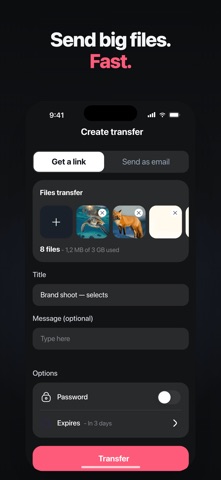
Select files from your Photos library, iCloud Drive, or On My iPhone storage. Or open the camera directly in the app and capture a photo or video to include instantly. Set a title, add an optional message, configure a password, choose an expiry date, and tap Transfer. Your files are uploaded to a secure server and your link or email confirmation is ready within seconds.
SHARE VIA LINK
Generate a unique download link and share it through any platform — SMS, WhatsApp, Telegram, Facebook Messenger, Slack, email, or any other channel. Anyone who receives the link opens it in a browser and downloads your files immediately. No app installation, no account creation, and no technical setup required on their end.
SEND FILES DIRECTLY TO EMAIL
Enter one or more email addresses and iTransfer delivers the download link straight to each inbox automatically. Add multiple recipients to send the same files to an entire team or group in one single transfer. Each person receives their own download notification without you needing to forward messages manually.
PASSWORD PROTECTION
Add a password to any transfer link to ensure only intended recipients can access your files. The recipient is prompted to enter the password before the download begins. Ideal for confidential documents, sensitive images, private creative work, or any content you need to restrict to specific people.
EXPIRY DATE CONTROL
Control exactly how long your files remain available for download. Free plan users can set transfers to expire after 1 day or 3 days. Pro users can choose 7 days, 30 days, 60 days, or up to 1 full year. Once the expiry date passes, the link is automatically deactivated and the files are removed from the server.
TRACK SENT TRANSFERS
Every transfer you create is logged in the Sent tab. View the transfer name, total file size, number of files, date created, and days remaining before the link expires. A red badge marks transfers nearing their deadline.
MULTIPLE FILE SOURCES
Add files from Photos in original quality with full EXIF metadata preserved. Select documents, archives, a