Expense Collector

Expense Collector Summary
Expense Collector is a free, with in-app purchases iOS app in Finance by Lifeng Chen. Released in Jun 2026 (3 months ago). It has 4.00 ratings with a 5.00★ (excellent) average. Based on AppGoblin estimates, it reaches roughly 96 monthly active users and generates around $<10K monthly revenue (100% IAP / 0% ads). Store last updated Jul 1, 2026
Expense Collector SDKs Summary
App not yet scanned for SDKs.
5★
Ratings: 4.00
Screenshots


App Description
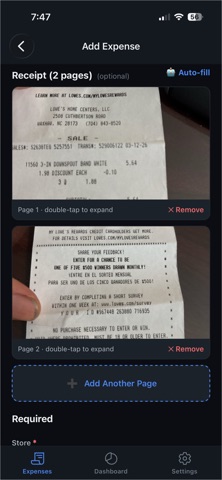
Expense Collector turns a pile of receipts into a tax-ready report. Snap or import a photo or file and the AI reads the merchant, amount, date, and the right tax category — so your deductions are organized all year, not the night before they're due. It also can be used on daily expense. analyze spend, and keep the receipts for return or refund or IRS audit.
BUILT FOR TAX DEDUCTIONS
• Schedule C (business / self-employed): advertising, supplies, office, mileage, meals, contract labor, and more — each mapped to its IRS Schedule C line.
• Schedule E (rental real estate): tie every expense to a specific property — repairs, cleaning, management fees, insurance, mortgage interest, utilities — mapped to its Schedule E line.
• Each export shows the exact tax schedule and line, so you (or your CPA) know precisely where every dollar goes.
SCAN ANY RECEIPT
• AI extraction pulls merchant, total, date, address, and category automatically.
• Reads foreign-language receipts and detects the currency.
• Handles long and multi-page receipts.
ORGANIZE BY PROPERTY
• Add your rental properties once.
• Every rental expense is tied to a property, so your Schedule E totals are broken out per property — ready to file.
SEE WHERE YOUR MONEY GOES
• Dashboard with spending by category, by property, and year-over-year tax-year views.
• Filter by Tax/Business, Tax/Rental, or General.
EXPORT FOR TAX TIME
• One tap to export CSV, Excel, or PDF.
• Includes the tax-schedule column and a per-property Schedule E breakdown.
WORKS IN YOUR LANGUAGE
• Available in English, Spanish, Chinese, Portuguese, and Hindi.
Premium subscription unlocks unlimited receipts and full exports.
Tax schedule labels are suggestions based on category — confirm your filing with your tax professional.