Welcome VPN: VLESS Proxy

Welcome VPN: VLESS Proxy Summary
Welcome VPN: VLESS Proxy is a free iOS app in Tools by WELCOME TECH LLP. Released in Jun 2026 (4 months ago). It has 19 ratings with a 5.00★ (excellent) average. Based on AppGoblin estimates, it reaches roughly 202 monthly active users . Store last updated Oct 5, 2026
Recent activity: 1.00 new ratings this week View trends →
SDK intelligence: AppGoblin detected 3 development tools(e.g. Google), 1 ad networks,and 1 analytics: product integrated into Welcome VPN: VLESS Proxy. View full SDK list →
Welcome VPN: VLESS Proxy SDKs Summary
Welcome VPN: VLESS Proxy was last scanned for SDKs on 2026-09-26. Below is the overview of third-party companies detected in the app. The full list of SDKs, permissions and unknowns is available here.
 Google
 Sentry.io
 nanopb
 Firebase
5★
Ratings: 19
Screenshots



App Description
WelcomeVPN is a VLESS, VMess, Trojan and Shadowsocks client built on Xray. Paste your key or a subscription link and connect with one tap. No account needed.
Built on Apple's secure Network Extension framework, WelcomeVPN keeps your traffic encrypted on public Wi-Fi, hotels, airports and cafés, so your data stays yours.
WHY WELCOMEVPN
• One-tap connect — no complicated setup
• No account required — nothing to sign up for
• Bring your own config — paste a link or scan a QR code
• Send your key to the TV — no typing with the remote
• Lightning-fast modern protocols for smooth streaming and browsing
• Clean, simple design in 5 languages
• Large text and VoiceOver: the interface follows your iOS accessibility settings
SUPPORTED PROTOCOLS
VLESS, VMess, Trojan, Shadowsocks and SOCKS — connect to virtually any modern server or subscription link.
SERVERS & SUBSCRIPTION LINKS
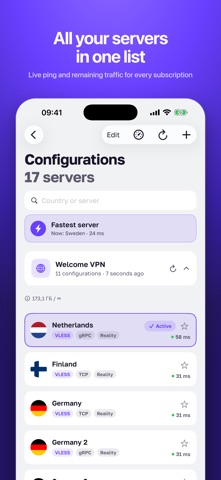
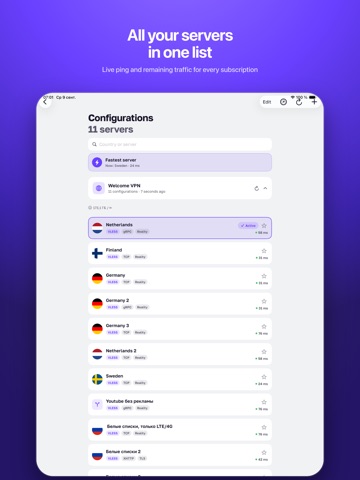
• Import a subscription link and get all its servers at once
• See remaining traffic and expiry at a glance
• Refresh servers in one tap to always stay up to date
• Switch between locations with clear country flags
• Keep multiple keys and switch any time
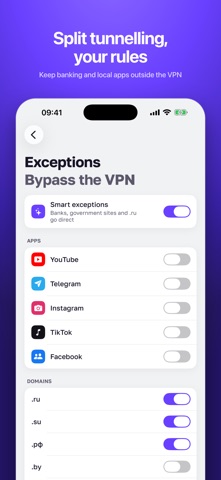
SPLIT TUNNELLING (EXCEPTIONS)
Choose what goes through the VPN and what doesn't. Exclude specific domains or popular services so local apps and sites keep working at full speed while everything else stays protected.
SEND YOUR KEY TO THE TV
Using Welcome VPN on your smart TV? Open Settings → “Send to TV” on your iPhone and enter the short code from the TV screen, or scan its QR code. Your key or whole subscription arrives on the TV in seconds — no typing long links with the remote.
PRIVATE BY DESIGN
Your traffic is encrypted between your device and your server. You decide which server to trust — WelcomeVPN is the client that connects you.
GET CONNECTED IN SECONDS
1. Open WelcomeVPN
2. Paste your VPN link or scan a QR code
3. You're protected
WelcomeVPN is a VPN client. To connect you need a compatible VPN configuration or subscription link from a provider you trust.
Questions? Contact us at contact@welcomevpn.net